BallEngine

Flood Fill 3D:
Fill it until the glass gives

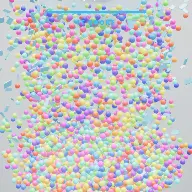
Thousands of balls poured into a glass room on the beat, a fill line drawn as the target, and a burst when the pile finally reaches it.
Play the preview

In development0 creators want this next

A frame from Flood Fill 3D
Open the studio to run this mode live.

Flood Fill 3D is being built right now

The engine, the physics and the look are done enough to watch. What is not finished is everything around them: the settings, the presets and the export path. So we shipped it as a preview instead of sitting on it.

The order is decided by these votes rather than by us, and the most-voted modes go first. If this is the one you want, say so.

What you can do now
Open it in the studio and watch a full run, with sound, exactly as it stands today.
What is held back
Settings, randomize and export. The preview runs on our defaults so every viewer judges the same version.
When it ships
The most-voted unfinished mode is the one we take next.

What Flood Fill 3D does

Thousands of balls pour into a glass room on the beat until the pile reaches the fill line, and then the glass gives way.

Flood Fill 3D is a container, a target and a burst. A recognisable 3D space, a glass box, a room, a staircase, a funnel or a cylinder, fills with thousands of balls poured in on the beat. A fill line is drawn on the container as a visible goal. When the pile reaches it, the glass gives way and the whole pile bursts out.

The pour is choreographed rather than constant. A burst is released per note of the loaded song, so the stream pulses with the music and a drop dumps a wall of balls at once. There is a steady-stream option if you want the older, flatter behaviour, but the beat-driven pour is what makes the fill feel authored.

The goal is deliberately legible. The fill line is drawn on the container, a progress readout reports the count against the target, and cracks build up in the glass as the pile approaches. Nothing about how close the run is to its payoff is left for the viewer to guess.

How a run plays out

The exact sequence the engine runs in this mode, from the first frame to the moment the run resolves.
  1. 1.

    A container is chosen

    A glass box, a room, a staircase, a funnel or a cylinder. The shape decides how the pile builds and where it stalls, since a funnel concentrates the pour and a staircase spreads it.

  2. 2.

    Balls pour on the beat

    A burst is released per note of the song rather than a constant trickle, so the stream pulses and a musical drop arrives as a wall of balls.

  3. 3.

    The pile climbs toward the line

    Thousands of balls settle physically. The fill line is drawn on the container and progress is reported as a count against the target with a progress bar.

  4. 4.

    The glass gives way

    When the pile reaches the line, the container fails and the whole pile bursts out of it. Cracks build up beforehand so the failure is signposted rather than sudden.

Every control in Flood Fill 3D

These are the settings this mode adds on top of the shared physics, visual, audio, and export controls. Names match the studio sidebar exactly.

Container

  • Container
  • Shape
  • Show Container
  • Glass Tint

Shape is the biggest structural decision. A funnel fills fast at the bottom and slows; a room fills evenly; a staircase produces terraces.

The pour

  • The Pour
  • Pour Mode
  • Follow The Song

Follow The Song is what turns the pour into choreography. Stream mode restores a constant rate, which is calmer and considerably less dramatic.

The goal

  • The Goal
  • Fit Container To Pour
  • Show Fill Line
  • Show Progress
  • Goal Caption

Show Fill Line and Show Progress are what make the run legible. Without them the video is balls falling; with them it is a countdown.

Payoff and look

  • The Payoff
  • Ending
  • Cracks Build Up
  • Show Counter
  • Counter Style
  • Color
  • Color Mode
  • Gradient End
  • Override Audio

Cracks are the tell. They let a viewer see the failure coming a few seconds before it happens, which is where the anticipation lives.

Why Flood Fill 3D videos hold attention

What keeps people watching this mechanic.

The goal is drawn on the container

A visible line on the glass means the viewer knows exactly what is being aimed at from the first second, with no caption needed.

The pour has a rhythm

Beat-driven bursts mean the stream pulses with the music, so the fill accelerates audibly and visibly at the same moments.

Cracks promise the ending

Damage accumulating in the glass tells the viewer the burst is coming without saying when. That gap is the tension.

The burst is a real payoff

Thousands of balls escaping at once is a genuinely large event, and it is the frame people replay.

Videos you can make in this mode

Each of these is a different configuration of the same mode, so one setup session produces a batch of related uploads.

Glass box fill

The plainest container with the fill line and progress on. The clearest version of the format.

Room flood

A recognisable room shape, which gives the scale of the pile something familiar to be measured against.

Funnel rush

A funnel that fills quickly at the base and slows near the line, which naturally builds tension into the last stretch.

Staircase terraces

A staircase container so the pile builds in visible steps rather than as one level.

Drop-synced pour

A track with a big drop, so the wall of balls arrives exactly when the music does.

Gradient fill

Colour mode set to a gradient so the depth of the pile is readable as colour.

Make your first Flood Fill 3D video

The order that works. Following it out of sequence usually means retuning settings you already set.
  1. 1.

    Pick the container

    Choose the shape first. It decides how the pile builds and how long the fill takes.

  2. 2.

    Turn on the goal

    Show the fill line and the progress readout. This is what turns a pour into a countdown.

  3. 3.

    Sync the pour

    Enable Follow The Song so bursts arrive per note and the stream pulses with the track.

  4. 4.

    Set the crack build-up

    Cracks should start appearing well before the line is reached, so the ending is anticipated rather than abrupt.

  5. 5.

    Watch the burst

    Play through to the failure and confirm the camera holds it. That frame is the payoff and it should not be cut short.

Settings that make the difference

  1. The fill line is the difference between a satisfying video and an aimless one. Always show it.
  2. A funnel is the easiest way to get a tense last few seconds without changing the pour rate.
  3. Match the drop in your track to roughly two thirds of the fill, so the wall of balls arrives while the outcome is still in doubt.
  4. Gradient colour makes depth readable, which matters once the pile is deep enough that the top is all the viewer can see.
  5. Cracks are cheap anticipation. Start them early.

What breaks a run

  1. Hiding the fill line for a cleaner look, which removes the goal and leaves the viewer with nothing to wait for.
  2. A container so large the fill takes minutes. Scale it to the runtime you want.
  3. Stream pour mode with a rhythmic track, which throws away the mode’s tightest link between audio and picture.
  4. Cutting the export before the burst finishes, which spends the whole run and skips the payoff.

Choreographing the pour

A constant stream is the obvious way to fill a container and the least interesting. The rate never changes, so nothing in the pour itself carries information, and the only thing developing is the level.

Releasing a burst per note ties the stream to the music. Quiet passages trickle, dense passages pour, and a drop dumps a wall of balls in a single instant. The fill rate becomes a second channel of the soundtrack.

It also produces better physics. A wall of balls arriving at once compresses the pile, displaces what is already there, and makes the surface visibly react, where a steady trickle just raises a level. The largest visual moments in a run come from the largest musical ones, which is exactly where you want them.
Making the goal legible

A container filling up is inherently watchable but not inherently structured. Without a target, a viewer cannot tell whether they are ten seconds or ninety from anything, and the most common way this kind of video fails is that people leave before the payoff exists.

Three elements fix that together. The fill line is drawn on the container so the target is part of the scene. The progress readout gives the count against that target as a number. And the cracks build up in the glass as the pile approaches, which is a purely visual signal that reads even at a glance.

The three overlap deliberately. A viewer looking closely reads the number, a viewer glancing sees the line, and a viewer with the sound off and half an eye on the screen still notices the glass failing. Every level of attention gets told the same thing.

Flood Fill 3D questions

Open Flood Fill 3D

Every control on this page is already in the studio. Load the mode and start from a working run.