BallEngine

Ball Crush 3D:
Heavier every round

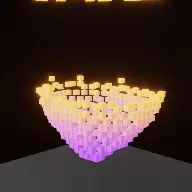
A chrome ball with its weight on screen dropped onto thousands of independent cubes, where the collapse is computed rather than animated.
Play the preview

In development0 creators want this next

A frame from Ball Crush 3D
Open the studio to run this mode live.

Ball Crush 3D is being built right now

The engine, the physics and the look are done enough to watch. What is not finished is everything around them: the settings, the presets and the export path. So we shipped it as a preview instead of sitting on it.

The order is decided by these votes rather than by us, and the most-voted modes go first. If this is the one you want, say so.

What you can do now
Open it in the studio and watch a full run, with sound, exactly as it stands today.
What is held back
Settings, randomize and export. The preview runs on our defaults so every viewer judges the same version.
When it ships
The most-voted unfinished mode is the one we take next.

What Ball Crush 3D does

A chrome ball with its weight written on screen drops onto a structure of thousands of cubes, and it gets heavier every round.

Ball Crush 3D is the metal-ball-drop format done as a real simulation. A chrome ball with its weight labelled on screen falls onto a structure built from thousands of small cubes. It flattens what it lands on. Then the round hard-cuts, the ball is heavier, and it does it again to a fresh structure.

Every cube is an independent rigid body with six degrees of freedom, its own box collider matching exactly the box the renderer draws, its own mass and its own inertia. No cube is bonded to any other, and none of them knows the others exist. The structure stands because each box is resting on the one below it.

That matters because it means the collapse is not an effect. When the ball lands, the cubes it displaces push the cubes next to them, and the failure propagates outward as far as the contacts carry it. Nobody authored where the structure gives way, and it is different every time.

How a run plays out

The exact sequence the engine runs in this mode, from the first frame to the moment the run resolves.
  1. 1.

    A structure is built from cubes

    Thousands of independent boxes are stacked into a structure. It holds together only through ordinary contact between neighbours, with no joints, bonds or scripted groups.

  2. 2.

    The ball drops with a stated weight

    A chrome ball falls with its weight labelled on screen. The number is the round’s premise, and it is the thing the viewer is tracking between rounds.

  3. 3.

    The collapse propagates

    Impact displaces the cubes underneath, which push their neighbours. The extent of the failure is an emergent property of the contacts rather than a preset animation.

  4. 4.

    Rounds escalate

    Each round the weight and the ball both grow, and the structure resets clean. The format is a sequence of escalating impacts, hard-cut between them.

Every control in Ball Crush 3D

These are the settings this mode adds on top of the shared physics, visual, audio, and export controls. Names match the studio sidebar exactly.

Rounds and structure

  • Rounds
  • Cube Block
  • Structure

Round count is the runtime. The structure choice decides whether the collapse reads as a tower buckling, a slab cratering, or a wall going over.

Drop and debris

  • Drop & Debris

How far the ball falls and how the debris behaves afterwards. Long-lived debris keeps the frame busy after the impact rather than settling immediately.

Look

  • Color
  • Cube Colors
  • Color B (top)
  • Ball Color
  • Show Weight
  • Weight Label
  • Label Style

A gradient from base to top colour gives the structure visible depth, which is what lets a viewer see how far into it the ball has gone.

Audio

  • Ball Impact
  • Cube Shatter
  • Box Landing
  • Override Audio

Three separate events. The landing of individual boxes after the main impact is what gives the aftermath its texture.

Why Ball Crush 3D videos hold attention

What keeps people watching this mechanic.

The number sets the expectation

A weight label tells the viewer how much heavier this round is before anything falls, so they know roughly how much worse it should be.

The collapse is unpredictable

Because nothing is scripted, the way a structure fails is genuinely different each time. Repeat rounds do not repeat visually.

Escalation gives the run a shape

Each round is bigger than the last, so the video has a curve rather than being a sequence of equal events.

The aftermath keeps playing

Cubes continue to settle after the impact, so the frame stays alive during the seconds a viewer would otherwise scroll.

Videos you can make in this mode

Each of these is a different configuration of the same mode, so one setup session produces a batch of related uploads.

Escalating rounds

Four or five rounds with a clearly growing weight label. The canonical version of the format.

Single hero drop

One round with a very large weight onto a tall structure. A short video built entirely on one collapse.

Tower buckle

A tall narrow structure, which fails by toppling rather than cratering. A completely different collapse from the same physics.

Gradient block

A strong colour gradient through the cube block so the depth of penetration is readable at a glance.

Weight-label series

A series where each video starts at the weight the last one ended on, which makes the channel itself an escalation.

Debris-heavy

Long-lived debris so the aftermath of each impact runs into the next round’s setup.

Make your first Ball Crush 3D video

The order that works. Following it out of sequence usually means retuning settings you already set.
  1. 1.

    Choose the structure

    Decide whether you want a tower, a slab or a wall. This determines the character of every collapse in the run.

  2. 2.

    Set the rounds

    Four or five is usually right. Each round is a complete beat, and past six the escalation stops registering.

  3. 3.

    Turn the weight label on

    The number is the premise. Style it large enough to read as a thumbnail.

  4. 4.

    Colour for depth

    Set a gradient from base to top so the viewer can see how deep the ball got.

  5. 5.

    Check the aftermath

    Watch a round settle fully. If the debris freezes instantly, extend it so the impact has a tail.

Settings that make the difference

  1. The weight label is the format. Without it, each round is just another drop.
  2. A gradient through the cube block is the cheapest way to make penetration depth readable.
  3. Tall narrow structures fail more dramatically than wide flat ones, because toppling reads better than cratering.
  4. Give box landings their own quiet sound. The scattered settling afterwards is what makes the impact feel heavy.
  5. Five rounds is usually the limit before the escalation stops being legible as escalation.

What breaks a run

  1. Hiding the weight, which removes the only thing tying the rounds into a sequence.
  2. A structure so small that even the first drop obliterates it, leaving nowhere for the escalation to go.
  3. Too many rounds, so the video becomes repetitive rather than escalating.
  4. A single flat cube colour, which makes a deep crater look identical to a shallow one.

Why every cube is a real rigid body

The cheap way to build this is to animate a collapse: pre-compute or hand-author how the structure comes apart and play it back on impact. It looks convincing once and identical every time after that, and viewers of this format watch it many times.

Here each cube has three degrees of positional freedom and three of orientation, a box collider that is exactly the box on screen, a mass and an inertia. There are no bonds and no groups. The structure is standing because each box happens to be resting on another one.

So the collapse is computed rather than replayed. A ball landing slightly off centre produces a different failure from one landing dead centre, and neither was authored. That is the property the format needs, because the whole appeal is watching something break in a way nobody arranged.
The weight label does the storytelling

Without a number, a heavier ball is just a bigger ball, and the difference between round three and round four is a size change a viewer may or may not register. The label converts that into a stated fact: this one is ten times the last.

It also sets an expectation the simulation then has to meet, which is where the tension in the format lives. The viewer reads the number, forms a guess about how bad it will be, and then finds out whether they were right. That loop is why the label belongs on screen rather than in the caption.

Because the label is per round and the rounds hard-cut, it also gives the video a structure without any editing. Each cut is a chapter break with its own headline, and the run reads as a sequence rather than as one long shot.

Ball Crush 3D questions

Open Ball Crush 3D

Every control on this page is already in the studio. Load the mode and start from a working run.