BallEngine

Chladni 3D:
Sand draws the note

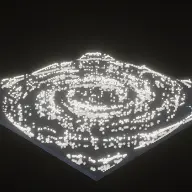
Grains on a vibrating plate settling where the plate is still, so the pattern in the frame is a picture of the frequency you are hearing.
Play the preview

In development0 creators want this next

A frame from Chladni 3D
Open the studio to run this mode live.

Chladni 3D is being built right now

The engine, the physics and the look are done enough to watch. What is not finished is everything around them: the settings, the presets and the export path. So we shipped it as a preview instead of sitting on it.

The order is decided by these votes rather than by us, and the most-voted modes go first. If this is the one you want, say so.

What you can do now
Open it in the studio and watch a full run, with sound, exactly as it stands today.
What is held back
Settings, randomize and export. The preview runs on our defaults so every viewer judges the same version.
When it ships
The most-voted unfinished mode is the one we take next.

What Chladni 3D does

Sand on a vibrating plate collecting along the lines that are not moving, so the pattern is a picture of the note being played.

Put grains of sand on a metal plate and vibrate it. Where the plate is moving, the grains are thrown around. Where it is not moving, along the nodal lines of the standing wave, they settle and stay. What is left is a Chladni figure: a drawing made by sound.

This is the most natively audio-driven mode in the product, because the pattern is decided entirely by the driving frequency. The note being played picks the mode numbers of the standing wave, so the figure reorganises with the melody. It is not a visualisation reacting to audio, it is the audio, drawn.

The hard part is musical rather than physical. A plate that swaps between a handful of patterns reads as one image for a whole clip, and a melody lives in about an octave. The pattern family and program settings exist to spread that octave across visibly different figures.

How a run plays out

The exact sequence the engine runs in this mode, from the first frame to the moment the run resolves.
  1. 1.

    A plate is driven at a frequency

    The plate vibrates at the frequency it is given, which sets up a standing wave with a specific pattern of moving regions and stationary lines.

  2. 2.

    Grains migrate to the nodes

    Sand on a moving part of the plate is thrown until it lands somewhere that is not moving. Over a few seconds the grains accumulate along the nodal lines and the figure appears.

  3. 3.

    The note picks the pattern

    The driving frequency comes from the melody, so each note selects its own mode numbers and its own figure. Change the note and the sand reorganises.

  4. 4.

    The program spreads the octave

    Because a melody spans a limited range, the pattern family and program decide how that range is mapped onto figures, so a song visits visibly different patterns rather than three similar ones.

Every control in Chladni 3D

These are the settings this mode adds on top of the shared physics, visual, audio, and export controls. Names match the studio sidebar exactly.

Plate

  • Plate
  • Plate Shape
  • Driving Frequency
  • Driven By

Plate shape changes the whole family of figures available, because the boundary decides where the nodal lines can run.

Pattern selection

  • Pattern Family
  • Program

This is the mapping from notes to figures. It is what stops a one-octave melody producing three near-identical patterns for a whole video.

Grains

  • Grains
  • Grain Color

Grain count is the resolution of the drawing. Too few and the lines are dotted; too many and the plate looks covered rather than patterned.

Look and sound

  • Color
  • Plate Color
  • Sound Override
  • Override Plate Sound

High contrast between grain and plate is essential. The figure is the entire content of the frame and it has to read instantly.

Why Chladni 3D videos hold attention

What keeps people watching this mechanic.

It is sound made visible

The premise explains itself in one sentence and then demonstrates itself continuously, which is rare and very shareable.

Every note reorganises the frame

A change of note means a change of figure, so the visual updates on the same schedule as the music with no mapping to design.

Symmetry is inherently attractive

Chladni figures are symmetric and intricate without being busy, which is a combination people will watch for a long time.

The transitions are the best part

The scramble between two stable figures is as watchable as the figures themselves, and it happens on every note change.

Videos you can make in this mode

Each of these is a different configuration of the same mode, so one setup session produces a batch of related uploads.

Melody plate

A simple melody with a wide interval range so the figures change clearly on each note.

Slow reveal

Long held notes so each figure has time to settle completely before the next one scrambles it.

Square versus circular plate

The same melody on two plate shapes, which produce entirely different families of figures.

High-grain detail

A dense grain count for fine, almost photographic nodal lines.

Two-colour minimal

A stark grain and plate palette so the figure reads as a graphic.

Scale sweep

A rising scale so the figures step through their family in order, which reads as a deliberate sequence.

Make your first Chladni 3D video

The order that works. Following it out of sequence usually means retuning settings you already set.
  1. 1.

    Choose the plate shape

    This determines the family of figures the mode can produce, so it is the first decision.

  2. 2.

    Pick a melody with range

    A tune that moves across intervals produces visibly different patterns; one that sits on three notes does not.

  3. 3.

    Set the program

    Choose how notes map to figures so the melody’s range is spread across distinct patterns.

  4. 4.

    Tune the grain count

    Enough grains for continuous lines, few enough that the plate is not simply covered.

  5. 5.

    Set the contrast

    Grain and plate colours far apart. The figure is the video, and it has to be legible at phone size.

Settings that make the difference

  1. Hold notes longer than feels natural. The sand needs a moment to settle before the figure is fully formed.
  2. A melody with wide intervals is worth more here than a pretty one, because interval size is what makes the figures differ.
  3. Contrast is the single most important look setting. Low contrast turns an intricate figure into a grey smudge.
  4. The transitions between figures are content. Do not cut them out in favour of only showing settled patterns.
  5. Plate shape is a bigger change than any colour setting, so try both before tuning anything else.

What breaks a run

  1. A melody confined to a few adjacent notes, which produces three similar figures for a whole video.
  2. Too many grains, which covers the plate and hides the nodal lines the mode exists to show.
  3. Fast passages, where the sand never has time to settle and the frame is permanently scrambled.
  4. Low contrast between grain and plate, which makes the entire content of the frame illegible.

The pattern is the frequency

Most audio-reactive visuals map a measured property of the sound onto a visual property: loudness to size, spectrum to colour. The mapping is arbitrary, and a viewer can usually tell, because there is no reason a bass note should make a circle bigger rather than smaller.

Here there is no mapping. The plate’s standing wave is determined by the driving frequency, the nodal lines are where that wave is zero, and the sand collects there because that is where it stops being thrown. The figure is not a representation of the note, it is a consequence of it.

That is why the mode holds up to being explained. Telling a viewer what they are looking at makes it more interesting rather than less, which is unusual for a generated visual.
Spreading one octave across many figures

A melody typically covers about an octave. The pattern table is ordered by the sum of the squares of the mode numbers, which means a single octave of raw frequencies lands on a small handful of neighbouring patterns that look much alike.

Left alone, that produces the mode’s worst failure: a video where the sand appears to be doing the same thing for thirty seconds while the music clearly changes. The plate looks broken even though the physics is exactly right.

The pattern family and program settings are the fix. They control how the melody’s range is distributed across the available figures, so consecutive notes land on visibly different patterns and the plate reorganises audibly and visibly together.

Chladni 3D questions

Open Chladni 3D

Every control on this page is already in the studio. Load the mode and start from a working run.