BallEngine

Phase Bloom:
Out of phase and back again

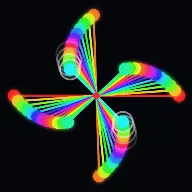
Rods spinning at slightly different speeds, drifting from a straight line into a wave, a spiral and a full bloom before snapping back into line with no seam.
Play the preview

In development0 creators want this next

A frame from Phase Bloom
Open the studio to run this mode live.

Phase Bloom is being built right now

The engine, the physics and the look are done enough to watch. What is not finished is everything around them: the settings, the presets and the export path. So we shipped it as a preview instead of sitting on it.

The order is decided by these votes rather than by us, and the most-voted modes go first. If this is the one you want, say so.

What you can do now
Open it in the studio and watch a full run, with sound, exactly as it stands today.
What is held back
Settings, randomize and export. The preview runs on our defaults so every viewer judges the same version.
When it ships
The most-voted unfinished mode is the one we take next.

What Phase Bloom does

Rods pivoting about one point at slightly different speeds, drifting from a line into a wave, a spiral and a full bloom, then snapping back into line.

Phase Bloom is the circle-metronome illusion. A set of thin rods all pivot about a single point at the centre of the screen, each carrying a coloured bob at its tip. Every rod turns at its own constant speed, and the speeds form a progression, so rod two is slightly faster than rod one and rod three slightly faster again.

They start on the same line. Within a second or two they are a travelling wave, then an S-curve, then a spiral, then a full rotating bloom. Nothing is animating between those states; they are what a set of constant-speed rotations looks like at different amounts of accumulated phase difference.

And then, if the loop is set to be seamless, every rod completes a whole number of turns at the same instant and they re-align exactly. The pattern collapses back to the starting line and repeats with no cut. It is a loop with no seam because the mathematics has no seam.

How a run plays out

The exact sequence the engine runs in this mode, from the first frame to the moment the run resolves.
  1. 1.

    Every rod shares one pivot

    All rods turn about the same point at screen centre. In diameter style each rod also carries an identical bob at the opposite end, so it reads as a spinning diameter rather than a spoke.

  2. 2.

    Speeds follow a progression

    Rod i completes its own number of full rotations over one loop. The progression can be arithmetic, quadratic or square-root, and the choice changes the shape of the wave the rods draw.

  3. 3.

    Phase difference does the work

    Because each rod turns at a constant speed, the angle between neighbours grows steadily. That single accumulating difference is what produces the wave, the S-curve, the spiral and the bloom in sequence.

  4. 4.

    The loop closes exactly

    With Seamless Loop on, every rod finishes a whole number of turns together and the pattern re-aligns to its starting line. The video can be cut anywhere in the cycle and still loop perfectly.

Every control in Phase Bloom

These are the settings this mode adds on top of the shared physics, visual, audio, and export controls. Names match the studio sidebar exactly.

Structure

  • Structure
  • Rod Style
  • Length Profile

Rod style decides whether you are looking at spokes or full diameters. Length profile sets whether the bobs sit on a circle, a spiral or something in between.

Motion

  • Motion
  • Speed Profile
  • Direction
  • Start
  • Seamless Loop

Speed profile is the most consequential setting here. Arithmetic gives the classic travelling wave; quadratic and square-root bend it into visibly different figures.

Look

  • Colour
  • Colour Mode
  • Colour B
  • Bob Size Profile
  • Show Rods
  • Show Bobs
  • Show Hub
  • Note Flash
  • Motion Trails
  • Solid Backdrop
  • Backdrop

Hiding the rods and showing only the bobs turns the same motion into a cloud of drifting points, which is a completely different video from the same settings.

Audio

  • Notes On
  • Note Source
  • Trigger Axis
  • Scale
  • Pitch Direction
  • Instrument

Notes fire as bobs cross the trigger axis. Because the crossings drift apart and back together, the audio arpeggiates and re-converges along with the visual.

Why Phase Bloom videos hold attention

What keeps people watching this mechanic.

The pattern never repeats within a loop

Every second shows an arrangement that has not appeared before in this cycle, so there is no point at which the viewer has seen what there is to see.

The re-alignment is a payoff

Watching order dissolve into chaos and then snap back into a straight line is intensely satisfying, and it happens on a schedule the viewer starts to sense.

It loops with no cut

A seamless loop keeps replaying without a visible seam, which is exactly what platforms that count repeat views reward.

The audio converges too

Notes triggered by axis crossings spread out and come back together with the rods, so the sound tells the same story as the picture.

Videos you can make in this mode

Each of these is a different configuration of the same mode, so one setup session produces a batch of related uploads.

Classic bloom

Arithmetic speeds, rods and bobs visible, seamless loop on. The canonical version of the illusion.

Bobs only

Rods hidden so only the coloured points are visible. Reads as an abstract particle drift and suits a calmer soundtrack.

Diameter spin

Diameter style so each rod shows two bobs. Doubles the visual density without adding any rods.

Trail bloom

Motion trails on so the drifting bobs leave arcs. The frame accumulates a drawing across the loop.

Note-driven scale

Notes on with a chosen scale and instrument, so crossings play an arpeggio that converges as the rods re-align.

Quadratic curve

A quadratic speed profile, which bends the travelling wave into a noticeably different family of shapes.

Make your first Phase Bloom video

The order that works. Following it out of sequence usually means retuning settings you already set.
  1. 1.

    Set the rod count

    More rods make a denser bloom and a finer wave. Start moderate and add until the pattern reads without becoming a solid disc.

  2. 2.

    Choose the speed profile

    Arithmetic for the classic look, quadratic or square-root for something less familiar. This is the biggest single look decision.

  3. 3.

    Turn on the seamless loop

    It costs nothing and it is what makes the video loop without a cut.

  4. 4.

    Set the colour mode

    A spectrum across the rods makes the phase drift legible as colour as well as position.

  5. 5.

    Add the notes

    Choose a scale and instrument, then check that the crossing pattern arpeggiates rather than firing all at once.

Settings that make the difference

  1. Seamless Loop is free and it is the difference between a clip and a loop. Leave it on.
  2. A spectrum colour mode makes the phase relationship visible, which is otherwise something you feel rather than see.
  3. Hiding the rods is the cheapest way to get a second completely different video from the same settings.
  4. Motion trails work best with fewer rods. With many, the trails fill the frame and the structure disappears.
  5. Because the motion is a closed-form function of time, an offline render reproduces a run exactly, so a loop you like is reproducible.

What breaks a run

  1. Too many rods, which fills the disc solid and hides the wave the mode exists to show.
  2. Turning the seamless loop off without a reason, which puts a visible seam in an otherwise perfect loop.
  3. A single flat colour across every rod, which throws away the clearest signal of the phase drift.
  4. Trails at high rod counts, where the accumulated arcs erase the structure within a few seconds.

Nothing here is animated

The wave, the spiral and the bloom are not keyframes and there is no transition between them. Each rod’s angle is a closed-form function of time: its starting phase plus its own angular speed times the clock. That is the entire simulation.

Everything the viewer sees is what that formula looks like at different amounts of accumulated phase difference. The travelling wave is a small difference, the spiral is a larger one, and the bloom is larger still. The illusion is that a shape is morphing; what is really happening is that constant speeds are drifting apart at a constant rate.

Because there is no integration and no per-frame state, nothing can drift or accumulate error. The offline renderer drives the same clock and reproduces a run bit for bit, which is why a loop that looks right in the preview is guaranteed to look right in the export.
What makes a loop seamless

A loop closes when every rod has completed a whole number of turns at the same instant. If rod one does three turns and rod two does four in the same period, they both arrive back at the start together and the pattern is exactly what it was at time zero.

That is why the speeds are specified as turns per loop rather than as arbitrary rates. Whole numbers guarantee re-alignment, and the seamless loop setting is simply the promise that the numbers will be kept whole.

The practical benefit is that the video has no correct start or end. Any point in the cycle is as good as any other, so a clip can be cut to any length that fits the platform and it will still loop perfectly.

Phase Bloom questions

Open Phase Bloom

Every control on this page is already in the studio. Load the mode and start from a working run.