BallEngine

Fireflies 3D:
Chaos that snaps into time

Tens of thousands of oscillators pulling on their neighbours until the coupling crosses its threshold and the whole swarm flashes at the tempo of your track.
Play the preview

In development0 creators want this next

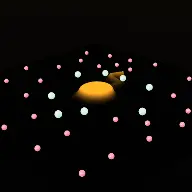
A frame from Fireflies 3D
Open the studio to run this mode live.

Fireflies 3D is being built right now

The engine, the physics and the look are done enough to watch. What is not finished is everything around them: the settings, the presets and the export path. So we shipped it as a preview instead of sitting on it.

The order is decided by these votes rather than by us, and the most-voted modes go first. If this is the one you want, say so.

What you can do now
Open it in the studio and watch a full run, with sound, exactly as it stands today.
What is held back
Settings, randomize and export. The preview runs on our defaults so every viewer judges the same version.
When it ships
The most-voted unfinished mode is the one we take next.

What Fireflies 3D does

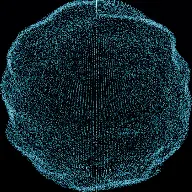
Tens of thousands of oscillators blinking in chaos until the coupling crosses a threshold and the whole swarm snaps into unison on the beat.

Fireflies really do synchronise. Each one has its own natural rhythm and nudges the ones nearby, and past a certain coupling strength the whole population undergoes a genuine phase transition and starts flashing together. That transition is a real result, and it is this mode.

Tens of thousands of phase oscillators, each with its own natural frequency, coupled to the handful of neighbours around it. Below the critical coupling the swarm blinks in incoherent chaos. Push the coupling past it and the population locks. There is no in-between state that lasts.

The music sync is causal rather than choreographed, which is the whole reason the mode exists. The swarm’s mean natural frequency is set to the track’s tempo, so a locked swarm flashes at exactly the BPM. Nothing tells it when to flash. It flashes on the beat because that is its frequency.

How a run plays out

The exact sequence the engine runs in this mode, from the first frame to the moment the run resolves.
  1. 1.

    Every firefly has its own rhythm

    Each oscillator carries a natural frequency drawn around the population mean, so left alone they drift apart and the swarm blinks incoherently.

  2. 2.

    Neighbours pull on each other

    Each oscillator is coupled to a handful of nearby ones and adjusts its phase toward theirs. The coupling strength is the one number that decides everything.

  3. 3.

    The transition is genuine

    Below a critical coupling the swarm cannot lock at all. Above it, it locks. That is a real phase transition rather than a fade between two animations.

  4. 4.

    The tempo is the frequency

    The population’s mean natural frequency is set from the track’s tempo, so a synchronised swarm flashes at the BPM without being told to.

Every control in Fireflies 3D

These are the settings this mode adds on top of the shared physics, visual, audio, and export controls. Names match the studio sidebar exactly.

Tempo and coupling

  • Tempo
  • Coupling (the drop)

Coupling is the drop. Raising it through the critical value is what makes the swarm snap into unison, and that is the whole arc of the run.

Two swarms

  • Two Swarms
  • Competing Swarms

Two populations with different frequencies compete for the field, so synchronisation becomes a contest rather than a single outcome.

Look

  • Look
  • Sync Meter
  • Show Sync %

The sync meter states how close the swarm is to unison. It is what lets a viewer see the transition coming instead of only noticing it afterwards.

Sound

  • Sound
  • Per-Event Sounds

Because the flash rate is the tempo, the swarm can voice the beat itself rather than sitting under a track that provides it.

Why Fireflies 3D videos hold attention

What keeps people watching this mechanic.

The snap is a genuine payoff

Chaos becoming unison in a couple of seconds is a large, unmistakable event, and it is the thing the whole run is building toward.

The sync meter is a progress bar

A percentage climbing toward the transition tells the viewer that something is about to happen and roughly when.

The lock lands on the beat

Because the mean frequency is the tempo, a locked swarm flashes with the music, so the payoff is audible and visible together.

Two swarms make it a contest

Competing populations turn synchronisation into a question of which rhythm wins, which is a second hook layered on the first.

Videos you can make in this mode

Each of these is a different configuration of the same mode, so one setup session produces a batch of related uploads.

Coupling ramp

Coupling raised through the critical value on the drop so the swarm snaps into unison with the music.

Sync meter run

The percentage on screen throughout, so the transition is signposted from the start.

Competing swarms

Two populations with different frequencies fighting for the field. The most dramatic version.

Slow build

A long incoherent phase before the coupling rises, so the chaos is established before it resolves.

Tempo match

The swarm’s mean frequency set precisely to a track’s BPM so the locked flash is exactly on the beat.

Loop

Coupling dropped back below critical so the swarm falls apart and re-synchronises, on repeat.

Make your first Fireflies 3D video

The order that works. Following it out of sequence usually means retuning settings you already set.
  1. 1.

    Set the tempo

    Match the swarm’s mean natural frequency to the track’s BPM so a locked swarm flashes on the beat.

  2. 2.

    Plan the coupling ramp

    Start below critical and raise it through the threshold at the moment you want the snap.

  3. 3.

    Show the sync meter

    The percentage is what turns an abrupt change into an anticipated one.

  4. 4.

    Consider two swarms

    If the run needs more than one event, competing populations add a second question.

  5. 5.

    Time the snap to the drop

    Put the transition on the biggest moment in the track. It is a large visual event and it deserves one.

Settings that make the difference

  1. The snap is the video. Everything before it is setup, so do not let the incoherent phase run longer than it needs to.
  2. The sync meter costs nothing and adds anticipation, which is the one thing an abrupt transition otherwise lacks.
  3. Match the tempo exactly. The mode is at its best when the flash rate and the track are the same number rather than close.
  4. Competing swarms are worth trying on longer runs, because a single transition is one event and a minute needs more.
  5. Dropping the coupling back below critical gives a clean loop point.

What breaks a run

  1. A coupling that starts above critical, so the swarm is already synchronised and the transition never happens.
  2. A mean frequency that does not match the track, which leaves a locked swarm flashing near but not on the beat.
  3. Hiding the sync meter, which turns a signposted build into an unexplained sudden change.
  4. An incoherent phase so long the viewer leaves before the payoff.

Causal sync, not choreographed sync

Almost every audio-reactive visual is choreographed: the animation is told when the beat is and responds to it. The result looks synchronised because it was instructed to be, and it will look synchronised to any track you give it.

Here two numbers go straight into the physics rather than into an animation curve. The population’s mean natural frequency is set to the track’s tempo, and the coupling strength is driven by the arrangement. Nothing ever tells a firefly to flash.

The swarm flashes on the beat because its oscillators run at the beat frequency and have pulled each other into agreement. That is a different claim from "it looks synchronised", and it is why the lock feels like something happening rather than something being played back.

Why a transition beats a fade

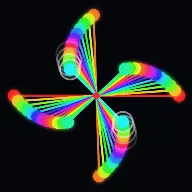
The Kuramoto model has a critical coupling. Below it, the population cannot maintain coherence and the order parameter sits near zero regardless of how long you wait. Above it, coherence grows and the swarm locks. There is no long intermediate regime.

That sharpness is exactly what a video wants. A gradual drift from chaos into order would be a slow dissolve, and slow dissolves are not events. A threshold crossing is an event: the swarm goes from visibly incoherent to visibly unified in a couple of seconds.

It is also why the sync meter matters so much. The transition is fast enough that a viewer who is not primed can miss what happened, and a percentage climbing toward a threshold is the cheapest possible way to tell them to watch.

Fireflies 3D questions

Open Fireflies 3D

Every control on this page is already in the studio. Load the mode and start from a working run.