BallEngine

Color Match:
Only the right colour breaks

The ball cycles through a palette and can only shatter what it currently matches, so every approach is a question of whether the timing lands.
Play the preview

In development0 creators want this next

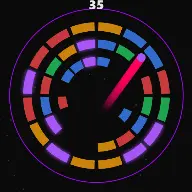
A frame from Color Match
Open the studio to run this mode live.

Color Match is being built right now

The engine, the physics and the look are done enough to watch. What is not finished is everything around them: the settings, the presets and the export path. So we shipped it as a preview instead of sitting on it.

The order is decided by these votes rather than by us, and the most-voted modes go first. If this is the one you want, say so.

What you can do now
Open it in the studio and watch a full run, with sound, exactly as it stands today.
What is held back
Settings, randomize and export. The preview runs on our defaults so every viewer judges the same version.
When it ships
The most-voted unfinished mode is the one we take next.

What Color Match does

The ball keeps changing colour and can only break bricks that match it right now, so every approach is a question of timing.

Color Match puts a rule between the ball and the destruction. Concentric rings of coloured brick segments fill the arena, a single ball bounces inside them, and the ball is continuously cycling through a small palette. It can only shatter a brick whose colour matches the colour it is wearing at that instant.

A mismatch is not a miss. The brick reflects the ball with a clink and the ball carries on, now a different colour and heading somewhere else. So the arena is never inert: contact always does something, it just does not always break anything.

Bricks matching the ball’s live colour are highlighted, which is the design decision that makes the whole format work. The viewer can see which bricks are currently breakable and is therefore playing along, asking on every approach whether the colour will still be right when the ball arrives.

How a run plays out

The exact sequence the engine runs in this mode, from the first frame to the moment the run resolves.
  1. 1.

    Rings of coloured bricks fill the arena

    Concentric rings of brick segments are laid out inside the standard container, each segment carrying a colour from the palette.

  2. 2.

    The ball cycles through the palette

    The ball changes colour continuously, either on a flow or on every bounce. Its current colour is the only thing that decides what it can destroy.

  3. 3.

    Match breaks, mismatch clinks

    Contact with a matching brick shatters it and advances the audio. Contact with any other brick reflects the ball with a distinct clink, so the two outcomes are audibly different.

  4. 4.

    Clearing the arena pays off

    When every brick is gone a colour-flood payoff fires and the round auto resets. The last few bricks are the hardest, because the odds of arriving in the right colour do not improve.

Every control in Color Match

These are the settings this mode adds on top of the shared physics, visual, audio, and export controls. Names match the studio sidebar exactly.

Bricks

  • Bricks
  • Show Counter

Brick count is the runtime. The counter is worth leaving on because the mode is a checklist as much as a destruction video.

Colours

  • Colors
  • Palette (comma-separated hex)

Palette size is the difficulty control. Three colours means roughly one in three contacts can break; six means one in six, and a much longer, tenser run.

Cycling

  • Cycle On Bounce
  • Flow
  • Constant Speed

Cycle On Bounce ties the colour change to impacts, which is predictable and readable. Flow changes it continuously, which makes timing a matter of luck rather than of counting.

Audio

  • Source
  • Melody
  • Effect
  • Match Break
  • Mismatch Clink
  • Wall Bounce
  • Payoff
  • Override Global Audio

The clink is as important as the break. Two clearly different sounds let a viewer hear near-misses without watching for them.

Why Color Match videos hold attention

What keeps people watching this mechanic.

The viewer is playing along

Highlighted bricks mean anyone can see which contacts would count. That turns passive watching into a running prediction, which is the strongest form of attention there is.

Near-misses are constant

A ball arriving at the right brick in the wrong colour happens several times a run. Each one is a small unscripted disappointment that keeps the viewer invested.

The arena thins unevenly

Whole clusters of one colour vanish while another colour survives untouched, so the board keeps changing shape rather than eroding uniformly.

The last brick is genuinely hard

The odds never improve, so the finish is a real wait. The payoff flood arrives as relief rather than as a formality.

Videos you can make in this mode

Each of these is a different configuration of the same mode, so one setup session produces a batch of related uploads.

Three-colour clear

A small palette so the run moves. The most readable version and the best first video.

Six-colour endurance

A large palette where most contacts clink. Much longer and far tenser, with the last bricks taking real time.

Bounce-cycled

Cycle On Bounce so the colour changes on a schedule the viewer can follow, which makes them better at predicting than the ball is.

Brand palette

Palette set to your channel colours. The mechanic does the work and the video is unmistakably yours.

Counter-led clear

Counter on and prominent, so the video reads as a countdown to zero bricks.

Two-colour speedrun

A two-colour palette clears fast and loops well for short feeds.

Make your first Color Match video

The order that works. Following it out of sequence usually means retuning settings you already set.
  1. 1.

    Set the palette

    Choose how many colours are in play. This is the difficulty and the runtime in one setting.

  2. 2.

    Choose the cycling

    Bounce-based cycling is readable, flow-based cycling is chancier. Pick one and keep it consistent across a series.

  3. 3.

    Set the brick count

    More bricks means a longer run, but the tail lengthens faster than the middle does. Time a full clear before scaling.

  4. 4.

    Separate the sounds

    Give break and clink clearly different sounds so the near-misses are audible.

  5. 5.

    Check the highlight

    Confirm that currently breakable bricks are obviously distinguishable at phone size, because that is the whole hook.

Settings that make the difference

  1. Three colours is the sweet spot. Two is too easy to be tense, six makes the tail longer than most viewers will wait for.
  2. The highlight on matching bricks is the format. If it is subtle, the viewer cannot play along and the mode collapses into ordinary brick breaking.
  3. Use colours that are distinct in shape as well as hue where you can, since some viewers will not separate similar shades reliably.
  4. The clink is not a failure sound. Make it pleasant, because the viewer will hear far more of them than breaks.
  5. A palette drawn from your channel colours costs nothing and makes every video in the series recognisable.

What breaks a run

  1. A palette of similar shades. If the viewer cannot tell which bricks match, every contact looks arbitrary.
  2. Too many bricks with a large palette, which produces a tail so long the run stops feeling like it is progressing.
  3. The same sound for break and clink, hiding the difference between the two events the mode is built on.
  4. Turning the counter off. Without it, a long clear has no visible sense of progress.

Why the mismatch has to feel good

In a mode where roughly two thirds of contacts do not break anything, the failure case is the majority of the run. Treating it as a failure would make most of the video feel like nothing happening.

So a mismatch is given its own physicality: the brick reflects the ball with a clink and a deflection. The ball’s path changes, its colour is now different, and the state of the run has genuinely moved even though nothing broke.

That is why the clink should be a pleasant sound rather than a buzzer. The viewer is going to hear it far more often than the break, and a run that punishes the ear two thirds of the time will not be watched twice.
Palette size is the whole difficulty curve

With a palette of two, roughly half of all brick contacts break something. The arena empties quickly, the run is short, and there is very little tension because the ball is nearly always able to do damage.

With six, only about one contact in six counts. The arena thins slowly and the last few bricks can take a long time, because the odds do not improve as the board empties. That produces a genuinely tense endgame and a genuinely long one.

Three or four is where most good runs sit. There is enough mismatching for near-misses to be common, enough matching for the board to visibly progress, and a tail that is tense without outstaying the video.

Color Match questions

Open Color Match

Every control on this page is already in the studio. Load the mode and start from a working run.