
BallEngine

Target Hit:
Can it hit every one?

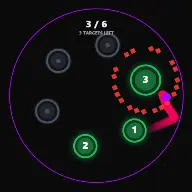
A board of targets, a single ball, and a counter that tells the viewer exactly how much is left before the question is answered.
Play the preview

In development0 creators want this next

A frame from Target Hit
Open the studio to run this mode live.

Target Hit is being built right now

The engine, the physics and the look are done enough to watch. What is not finished is everything around them: the settings, the presets and the export path. So we shipped it as a preview instead of sitting on it.

The order is decided by these votes rather than by us, and the most-voted modes go first. If this is the one you want, say so.

What you can do now
Open it in the studio and watch a full run, with sound, exactly as it stands today.
What is held back
Settings, randomize and export. The preview runs on our defaults so every viewer judges the same version.
When it ships
The most-voted unfinished mode is the one we take next.

What Target Hit does

One ball, a screen full of targets, and a counter asking whether it can light up every last one.

Target Hit poses a question in the first frame: can this ball hit all of them? A single ball bounces around the arena and a set of static targets sits waiting. Each fresh target the ball touches lights up, advances the melody by one note and takes one off the remaining counter.

That structure is an open loop, which is the most reliable retention device there is. There is a stated goal, a visible checklist, and no way to know whether it will be completed. A viewer who has seen the counter reach two cannot comfortably leave before it reaches zero.

Targets can be laid out as a picture, a shape, text, emoji or numbers, so the checklist itself carries a message. The last target lighting is the payoff: a resolving note, a banner, and an auto reset. Or, if you want it, no payoff at all.

How a run plays out

The exact sequence the engine runs in this mode, from the first frame to the moment the run resolves.
  1. 1.

    The targets are placed first

    A layout is generated from the option you choose: a shape, a picture, a line of text, emoji or numbered targets. The arrangement is static, so the challenge is fixed and identical for the whole run.

  2. 2.

    The ball sweeps the arena

    A single ball bounces around the standard container. Bounce Off Targets decides whether targets are solid obstacles that deflect the ball or pass-through markers that only register a hit.

  3. 3.

    Every fresh target advances the song

    A first touch lights the target, plays the next note of the melody and decrements the remaining counter. Repeat contacts do nothing, so the melody advances once per target rather than once per bounce.

  4. 4.

    The last target resolves, or does not

    Clearing the board fires a resolving note and a banner, then resets. With Cliffhanger on, the run deliberately stops one target short and shows PART 2 instead, withholding the ending on purpose.

Every control in Target Hit

These are the settings this mode adds on top of the shared physics, visual, audio, and export controls. Names match the studio sidebar exactly.

Targets

  • Targets
  • Layout
  • Picture
  • Shape
  • Text
  • Emoji
  • Number Targets
  • Show Counter

The layout is the message. Text and picture layouts turn the checklist into a reveal, so the video is about what is being drawn as much as whether it finishes.

Ball and physics

  • Ball & Physics
  • Bounce Off Targets

Bouncing off targets makes the path chaotic and the last few targets genuinely hard. Passing through keeps the ball on a predictable sweep and finishes more reliably.

Challenge

  • Challenge
  • Cliffhanger (Part 2)

Cliffhanger stops one short and posts PART 2. It is the classic sequel bait, and it works precisely because the checklist made the ending visible before it was withheld.

Audio

  • Source
  • Melody
  • Target Hit
  • Wall Bounce
  • Silent Wall Bounces
  • Melody On Wall Bounces
  • Accent On Each Dot
  • All Hit (Payoff)
  • Override Global Audio

Silent Wall Bounces is the setting that makes the format work musically: with walls quiet, the melody advances only on target hits, so the song is a record of progress.

Why Target Hit videos hold attention

What keeps people watching this mechanic.

The question is asked in frame one

A board full of unlit targets and a counter states the whole premise without a caption. Open loops like this are why the format keeps working.

The counter is a progress bar

Progress is legible at any moment, so a viewer always knows how much is left and how close the run is to paying off.

The last few are the hardest

Scattered survivors take far longer to hit than the first cluster, so the run naturally slows into a tense finish rather than fading out.

The cliffhanger converts to a second view

Stopping one short is the strongest sequel hook available, because the audience watched the checklist all the way down before it was taken away.

Videos you can make in this mode

Each of these is a different configuration of the same mode, so one setup session produces a batch of related uploads.

Full board clear

A shape layout, counter on, silent walls. The plainest and most reliable version of the format.

Picture reveal

Targets arranged as a picture, so clearing the board draws an image. The video has a subject as well as a challenge.

Word reveal

Text layout so the ball lights up a message one letter at a time. Works well for announcements and channel branding.

Part 2 cliffhanger

Cliffhanger on so the run halts one target short. Best used sparingly and only where a real part two exists.

Chaos board

Bounce Off Targets on so the ball is deflected constantly. Harder to finish and far less predictable.

Numbered countdown

Number targets hit in order, so the board doubles as a countdown the viewer can read from any point.

Make your first Target Hit video

The order that works. Following it out of sequence usually means retuning settings you already set.
  1. 1.

    Choose the layout

    Decide whether the board is a shape, a picture, text, emoji or numbers. This is the subject of the video.

  2. 2.

    Set the target count

    More targets means a longer run. Start modest and time a full clear before scaling up.

  3. 3.

    Silence the walls

    Turn on Silent Wall Bounces so the melody advances only on target hits, and the song becomes a record of progress.

  4. 4.

    Decide the ending

    Either a full clear with the payoff, or the cliffhanger. Do not switch between them within a series without warning.

  5. 5.

    Check the tail

    Watch a full run and see how long the last three targets take. That stretch is where viewers either stay or leave.

Settings that make the difference

  1. Silent Wall Bounces is the single most important audio setting here. With walls voiced, the melody races ahead of the progress and the link is lost.
  2. Keep unlit and lit targets strongly different. The whole format depends on being able to count what is left at a glance.
  3. Bounce Off Targets makes a run less reliable but far more dramatic. Use it when you have time to reshoot.
  4. A picture layout gives the video a reason to exist beyond the challenge, which travels much better on social feeds.
  5. Do not overuse the cliffhanger. It spends audience goodwill, and it only pays if part two actually arrives.

What breaks a run

  1. Too many targets. A board of a hundred takes minutes to clear and the counter stops feeling like it is moving.
  2. Leaving wall bounces voiced, so the melody advances constantly and the audio no longer tracks progress.
  3. Low contrast between hit and unhit targets, which makes the checklist unreadable and removes the entire hook.
  4. Using the cliffhanger with no part two. It is a promise, and an unmet one is remembered.

Why a checklist beats a timer

Both a countdown timer and a target counter give a video structure, but they ask different questions. A timer asks how long, which every viewer can answer immediately and therefore has no reason to stay for. A checklist asks whether, which nobody can answer.

The distinction matters most in the last quarter of a run. A timer at five seconds is uninteresting because the outcome is certain. Three scattered targets are the tensest part of the video, because the remaining ones are the hardest to reach and the ball is visibly struggling.

That is also why the counter should stay on screen. The tension only exists if the viewer knows exactly how many are left, and a board too dense to count by eye needs the number to do it for them.
Bouncing off targets, or through them

With Bounce Off Targets on, every target is an obstacle as well as a goal. The ball is deflected by the board it is trying to clear, so the path becomes genuinely chaotic and the arrangement changes as targets are consumed. Runs are unpredictable and sometimes stall.

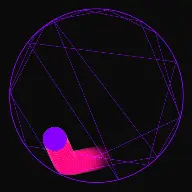
With it off, targets are markers. The ball sweeps its own path around the arena and lights whatever it passes through, so clearing is mostly a matter of coverage and time. Runs are longer but far more reliable.

For a series, the pass-through setting is usually the right default because it finishes predictably. Save the bouncing version for a single hero video where an unpredictable near-failure is the point, and be prepared to shoot it more than once.

Target Hit questions

Open Target Hit

Every control on this page is already in the studio. Load the mode and start from a working run.