
BallEngine

Metaballs 3D:
Liquid metal that merges

Blobs that bulge toward each other, fuse into one surface and neck apart again, drawn per pixel so the surface is exact at any distance.
Play the preview

In development0 creators want this next

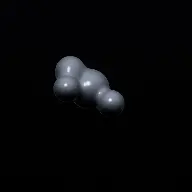
A frame from Metaballs 3D
Open the studio to run this mode live.

Metaballs 3D is being built right now

The engine, the physics and the look are done enough to watch. What is not finished is everything around them: the settings, the presets and the export path. So we shipped it as a preview instead of sitting on it.

The order is decided by these votes rather than by us, and the most-voted modes go first. If this is the one you want, say so.

What you can do now
Open it in the studio and watch a full run, with sound, exactly as it stands today.
What is held back
Settings, randomize and export. The preview runs on our defaults so every viewer judges the same version.
When it ships
The most-voted unfinished mode is the one we take next.

What Metaballs 3D does

Liquid metal blobs that stretch toward each other, merge into one surface, and pull apart again, drawn per pixel rather than as a mesh.

Metaballs are the classic liquid-metal effect: a handful of moving centres whose fields add together, so two blobs approaching each other bulge, stretch, touch and fuse into a single smooth surface. Pull them apart and the surface necks and separates.

The surface here is raymarched per pixel in a fragment shader rather than built as a mesh. That is the cheaper of the two available routes and by far the more stable one: there is no mesh to rebuild every frame and no marching-cubes grid to quantise the surface onto, so the shape is a pure function of the blob positions.

Which makes the simulation itself tiny. A small number of blobs, each with a position, a radius and a velocity, integrated at a fixed timestep. Every blob adds a term to the inner loop of a per-pixel raymarch, so the blob count is the one setting that really costs anything.

How a run plays out

The exact sequence the engine runs in this mode, from the first frame to the moment the run resolves.
  1. 1.

    A few blobs move

    Each blob has a position, a radius and a velocity, integrated at a fixed timestep. That is the entire simulation state.

  2. 2.

    The surface is a function of them

    A raymarch evaluates the combined field per pixel, so the surface is exact at any zoom level and never shows the faceting a mesh-based approach produces.

  3. 3.

    Blobs merge smoothly

    Overlapping fields blend rather than intersect, which is why approaching blobs bulge toward each other before touching instead of simply overlapping.

  4. 4.

    The beat spawns and merges

    A musical cue can spawn a new blob, so the surface reorganises on the track and merges become audible events.

Every control in Metaballs 3D

These are the settings this mode adds on top of the shared physics, visual, audio, and export controls. Names match the studio sidebar exactly.

Blobs

  • Blobs

The blob count is the mode’s one real cost, because each one adds a term to a per-pixel loop. It is also the difference between a sculptural look and a boiling one.

Motion

  • Motion
  • Movement

Slow motion reads as heavy liquid metal, faster motion as something lighter and more agitated.

Material

  • Material & Quality
  • Material
  • Custom Color
  • Blob Color

The material sells the substance. A polished metal reads as mercury; a softer material reads as wax or liquid glass.

Beat response

  • Beat Response
  • Spawn On Beat
  • Own Sounds
  • Spawn Sound
  • Merge Sound

A distinct merge sound is what turns fusion from something that happens into something the viewer notices.

Why Metaballs 3D videos hold attention

What keeps people watching this mechanic.

Merging is inherently tactile

Surfaces stretching toward each other and fusing is a motion people feel rather than analyse, which is why the effect has stayed popular for decades.

The surface never faults

Because it is evaluated per pixel, the surface is perfectly smooth at any scale, so close-ups reward attention rather than revealing geometry.

Beat spawns give it structure

New blobs arriving on the music turn a continuous flow into a run with discrete events.

Reflective material carries the frame

A polished surface picks up the environment, so even slow motion keeps the image changing.

Videos you can make in this mode

Each of these is a different configuration of the same mode, so one setup session produces a batch of related uploads.

Liquid metal

A polished metal material with slow motion and few blobs. The most recognisable version.

Beat spawn

Blobs arriving on the beat so the surface grows and reorganises with the track.

Two-blob study

Only two blobs, so every approach and separation is fully legible. The clearest demonstration of the effect.

Boiling mass

Many blobs in constant motion for a churning surface rather than a sculptural one.

Coloured glass

A translucent material for a completely different substance from identical motion.

Slow close-up

A tight camera on a slow merge, which the per-pixel surface can carry without any faceting.

Make your first Metaballs 3D video

The order that works. Following it out of sequence usually means retuning settings you already set.
  1. 1.

    Set the blob count

    Few for a sculptural look, many for a boil. This is also the mode’s main performance control.

  2. 2.

    Choose the material

    Metal, glass or something softer. The material decides what substance the viewer thinks they are looking at.

  3. 3.

    Slow the motion

    Liquid metal reads as heavy. Slower movement almost always looks more expensive here.

  4. 4.

    Add beat spawns

    Turn on spawn on beat so the surface has events rather than being one continuous churn.

  5. 5.

    Frame close

    The surface is exact at any zoom, so a tight camera costs nothing and shows the merges properly.

Settings that make the difference

  1. Fewer blobs almost always looks better. The effect is about individual merges, and a crowd hides them.
  2. Slow motion reads as heavy and expensive. Fast motion reads as a screensaver.
  3. A reflective material does a lot of work, because it keeps the image alive even when the blobs are barely moving.
  4. Give merges their own sound. Fusion is the event the mode exists for and it deserves to be audible.
  5. Close framing is free here, since the surface is computed per pixel rather than tessellated.

What breaks a run

  1. Too many blobs, which turns distinct merges into an undifferentiated boil and costs frame rate for the privilege.
  2. Fast motion, which removes the weight that makes liquid metal convincing.
  3. A flat matte material, which hides the surface curvature that the whole effect is made of.
  4. No beat response on a rhythmic track, leaving a continuous visual with no structure.

Per-pixel surface, not a mesh

There are two standard ways to render metaballs. One is to extract a mesh with marching cubes and draw it, which means rebuilding geometry every frame and quantising the surface onto a grid. The other is to raymarch the field directly in a fragment shader.

The raymarch is cheaper here and considerably more stable. There is no geometry to rebuild, no grid resolution to choose, and no popping when a feature is smaller than a cell. The surface is a pure function of the blob centres, evaluated fresh for every pixel.

The practical result is that close-ups are free. A mesh-based metaball surface reveals its tessellation when you push the camera in; this one is exact at any distance, so the most attractive shot in the mode is also the cheapest.

Why blob count is the only real setting

Every blob contributes a term to the inner loop of a per-pixel raymarch. That loop runs for every pixel on screen, several times per ray, so the cost of an additional blob is multiplied by the entire frame.

This is unusual among the 3D modes, where particle counts in the tens of thousands are normal. Here a handful of blobs is the working range, and that constraint turns out to be an aesthetic advantage.

The effect is about individual merges: two surfaces reaching for each other, touching, becoming one. With a dozen blobs there is always a merge happening somewhere and none of them is legible. With three or four, every merge is an event, which is what the mode is for.

Metaballs 3D questions

Open Metaballs 3D

Every control on this page is already in the studio. Load the mode and start from a working run.