BallEngine

Jelly 3D:
Will it fit through the hole?

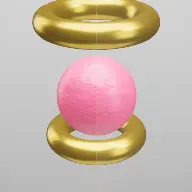
A real pressure soft body that wobbles, compresses and splats, put up against a hole that gets smaller every level.
Play the preview

In development0 creators want this next

A frame from Jelly 3D
Open the studio to run this mode live.

Jelly 3D is being built right now

The engine, the physics and the look are done enough to watch. What is not finished is everything around them: the settings, the presets and the export path. So we shipped it as a preview instead of sitting on it.

The order is decided by these votes rather than by us, and the most-voted modes go first. If this is the one you want, say so.

What you can do now
Open it in the studio and watch a full run, with sound, exactly as it stands today.
What is held back
Settings, randomize and export. The preview runs on our defaults so every viewer judges the same version.
When it ships
The most-voted unfinished mode is the one we take next.

What Jelly 3D does

A pressure soft body that wobbles, compresses and splats inside a glass container, with an optional challenge asking whether it will fit through the hole.

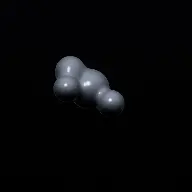
Jelly 3D is a real soft body, not a squashed sphere. The jelly is a closed triangle mesh whose vertices are point masses and whose edges are springs, plus a global pressure term that pushes every vertex outward in proportion to how far the enclosed volume has drifted from its rest volume.

That pressure term is the whole reason it looks right. Springs alone let a shell collapse like a deflated balloon; pressure is what makes it hold its shape, resist a squeeze and jiggle after an impact instead of simply deforming and staying deformed.

On top of the physics sits the squeeze challenge. A hole is presented, the jelly is routed toward it, and the question is whether it fits. The hole gets smaller each level, so a run escalates from obviously-yes to obviously-no with the interesting cases in between.

How a run plays out

The exact sequence the engine runs in this mode, from the first frame to the moment the run resolves.
  1. 1.

    A pressure soft body drops

    The jelly is simulated as a closed mesh of point masses and springs with a global pressure term. It deforms on contact and recovers, and the recovery is where the jiggle comes from.

  2. 2.

    It bounces inside glass

    A glass container bounds the run. Each impact compresses the mesh, and the compression and rebound are computed rather than animated, so no two impacts look alike.

  3. 3.

    The squeeze challenge poses a question

    A hole with a marked rim is presented and the jelly is routed toward it. Whether it fits is genuinely decided by the simulation, not by a script.

  4. 4.

    Levels tighten the hole

    Escalation shrinks the hole level by level, so the run moves from comfortable to impossible, and the tension sits in the middle where it could go either way.

Every control in Jelly 3D

These are the settings this mode adds on top of the shared physics, visual, audio, and export controls. Names match the studio sidebar exactly.

Jelly

  • Jelly
  • Shape
  • Detail (points)
  • Surface Smoothing
  • Jiggle

Detail is the trade between wobble fidelity and cost. Jiggle sets how long the mesh keeps moving after an impact, which is most of the mode’s character.

Squeeze challenge

  • Squeeze Challenge
  • Escalation
  • Level
  • Route To The Hole
  • Show Challenge Text
  • On-Screen Question
  • Loop The Challenge
  • Hole Rim Color

The on-screen question is what turns a physics toy into a video with a stake. Without it the viewer is watching jelly; with it they are waiting for an answer.

Container

  • Container & Drop
  • Container
  • Show Glass
  • Loop The Drop
  • Follow The Object

Follow The Object keeps the camera on the jelly, which matters because the interesting deformation is often small and fast.

Look and sound

  • Look
  • Jelly Color
  • Surface
  • Sound
  • Own Sounds
  • Impact Sound
  • Squish Sound
  • It-Fits Sound

Three distinct sounds carry the three events that matter: hitting something, being compressed, and getting through.

Why Jelly 3D videos hold attention

What keeps people watching this mechanic.

Soft bodies are inherently watchable

Deformation and recovery are motion people cannot predict frame to frame, which is why jelly footage holds attention with no premise at all.

The question has a real answer

Whether it fits is decided by the simulation. Nobody, including the person who set it up, knows for certain before it happens.

Escalation creates a series in one run

Each level is a fresh question with the same setup, so a single video contains several complete beats.

The squish is the sound people came for

A distinct compression sound on a genuine deformation is a strong sensory hook, and it fires several times a run.

Videos you can make in this mode

Each of these is a different configuration of the same mode, so one setup session produces a batch of related uploads.

Squeeze challenge

Escalating hole sizes with the on-screen question. The version with the strongest hook.

Free wobble

No challenge, just the jelly bouncing in glass. Calm, loopable and completely undemanding.

Shape series

The same challenge run with a ball, a rounded cube and a torus. Each deforms differently against the same hole.

High-detail close-up

More mesh points with the camera following the object, so the fine surface motion is visible.

Looping drop

Loop The Drop for a continuous fall-and-splat cycle that works as background content.

Impossible finale

A final level with a hole clearly too small, so the run ends on a definite no rather than trailing off.

Make your first Jelly 3D video

The order that works. Following it out of sequence usually means retuning settings you already set.
  1. 1.

    Choose the jelly

    Shape and detail first. A torus behaves very differently from a ball against the same hole.

  2. 2.

    Set the jiggle

    Tune how long the mesh keeps moving after an impact. This is the single most characterful setting in the mode.

  3. 3.

    Turn on the challenge

    Enable the squeeze challenge with the on-screen question, and set the escalation so the middle levels are genuinely uncertain.

  4. 4.

    Frame the camera

    Follow the object so the deformation stays large in the frame, since the detail is where the appeal is.

  5. 5.

    Voice the events

    Give impact, squish and it-fits their own sounds so each of the three beats is audible.

Settings that make the difference

  1. Jiggle is the personality control. A short jiggle reads as firm, a long one as liquid.
  2. The interesting hole sizes are the ones you cannot call. Set escalation so at least two levels are genuinely borderline.
  3. Higher detail costs performance and buys surface fidelity. Raise it only as far as the camera distance justifies.
  4. A distinct it-fits sound gives the payoff a marker, which matters because the fit itself can be over in three frames.
  5. The integration runs at a fixed timestep derived from simulation time, so an offline render reproduces the run exactly.

What breaks a run

  1. Running the challenge without the on-screen question, which leaves the viewer unsure what they are supposed to be watching for.
  2. Every level obviously passable, so the format never actually asks anything.
  3. Very high detail on a wide camera, where the extra mesh points are invisible and only cost frames.
  4. One sound for impact and squish, which flattens the two most distinct sensations in the mode.

Why pressure and not just springs

A mass-spring shell is the standard way to build a deformable object, and on its own it does not work for jelly. Without something holding the interior out, the shell collapses inward under its own constraints and reads as a deflated balloon rather than as a solid soft body.

The pressure term fixes that by treating the mesh as enclosing a volume. Every vertex is pushed along its area-weighted normal in proportion to how far the current enclosed volume has drifted from the rest volume, so a squeezed jelly pushes back everywhere at once rather than only where the springs are stretched.

That is also where the jiggle comes from. Pressure and springs restore the shape on slightly different timescales, so a compressed jelly overshoots on the way back and oscillates, which is exactly what real jelly does and exactly what makes the footage watchable.
The squeeze challenge as a question format

The physics alone would make a decent ambient video. What turns it into something with a reason to be watched to the end is the hole: a stated question with a binary answer that the simulation, not the author, decides.

The escalation matters as much as the question. A single hole is one beat; a sequence of shrinking holes is several, and it gives the viewer a way to calibrate. By the third level they have a sense of what this jelly can do, which makes the borderline cases genuinely suspenseful rather than arbitrary.

The last level is worth setting deliberately. Ending on a clear failure gives the run a definite full stop, where ending on a success invites the viewer to wonder whether it would have kept going. Either is a valid choice, but leaving it to chance usually is not.

Jelly 3D questions

Open Jelly 3D

Every control on this page is already in the studio. Load the mode and start from a working run.