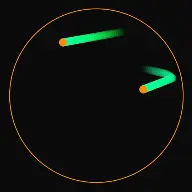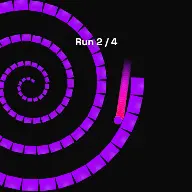
Spiral Mode:
Bouncing Ball Spiral Glass Breaker

Drop bouncing balls from the outside of a spiral track and watch them roll inward, shattering glass blocks sequentially as they head to the center.

Build Faceless Channels
Millions of Views Generated
Maximize Audience Retention
Bouncing ball reel

What Spiral Mode Actually Does

A rotating spiral tunnel packed with box targets. Balls are thrown in, driven inward, and clear the track on the way.

Spiral Mode drops balls into a rotating spiral tunnel lined with boxes. The spiral itself turns, the balls are thrown in with a chosen angle and power, and thrust carries them along the track while they knock the boxes out of the way.

The appeal is directional. Unlike a bounce loop, a spiral run has an obvious start at the outside and an obvious destination at the centre, so the viewer always knows how far along the run is and how much is left.

Because boxes are physical objects with mass, bounce, and air resistance, the debris behaves. A cleared box does not vanish, it is knocked away and interacts with everything still on the track, which is what keeps repeated runs from looking identical.

Mode Reference

Studio mode
Spiral
Core mechanic
Balls travel a rotating spiral tunnel clearing boxes
Targets
Boxes with mass, bounce, and air resistance
Drive
Throw power plus configurable forward thrust
Ends when
Balls reach the centre and the victory effect fires
Best canvas
Vertical 9:16 with the full spiral in frame
Open Spiral Mode

How A Run Plays Out

The exact sequence the engine runs in this mode, from the first frame to the moment the run resolves.

1

The spiral is generated and rotates

Spiral Scale and Spiral Rotation set the size and turn rate of the tunnel. Because the track rotates under the balls, the same throw produces a different route each time.

2

Boxes are placed along the track

Box Count, Box Spacing, and Placement Mode fill the spiral with targets. Box Width, Box Height, and the scale range decide whether the track is lined with uniform blocks or a varied mix.

3

Balls are thrown in

Throw Angle and Throw Power set the entry, Interval sets how often a new ball arrives, and Forward Thrust with Thrust Angle and Thrust Duration keeps balls moving along the track instead of stalling.

4

Boxes are cleared and debris interacts

Box Mass, Box Bounce, and Box Air Resistance decide how a struck box behaves. Cleared boxes stay in play as debris, which changes the route for every ball that follows.

Every Control In Spiral Mode

These are the settings this mode adds on top of the shared physics, visual, audio, and export controls. Names match the studio sidebar exactly.

Spiral track

Spiral ScaleSpiral RotationEdge ThicknessBorder ColorOpacity

The track geometry. Rotation is what stops repeated runs from following the same line and is the single biggest source of variety.

Box targets

Box CountBox SpacingBox WidthBox HeightMin Box ScaleMax Box ScaleBox StyleBox RotationPlacement Mode

Density and size decide the rhythm of the clears. Tight spacing gives constant contact, wide spacing gives distinct individual hits.

Box physics

Box MassBox BounceBox Air Resistance

Heavy boxes resist and stay near the track, light boxes fly away on contact. Air resistance decides how long debris keeps moving after it is hit.

Ball entry and drive

Throw AngleThrow PowerInterval (sec)Ball MassBall BounceForward ThrustThrust AngleThrust Duration (ms)Gravity Power

Thrust is what keeps a run moving. Without it balls settle in a low pocket of the spiral and the video stalls.

Look and effects

Color EngineColor AColor BGlow ColorGlow RadiusTextureTexture OpacitySpawn EffectBounce EffectVictory Effect

A two-colour engine with a glow radius is enough to make the track read at phone size. The victory effect marks the moment a run completes.

Spiral Mode Example Runs

Every clip below was rendered in this mode. Nothing here is borrowed from another mode.

Spiral Mode - Satisfying Physics | Fun Circle Games

Spiral Mode - Satisfying Physics | Fun Circle Games

Design mesmerizing spiral ball run simulations. Watch the ball smash rotating blocks with satisfying ASMR sound effects. Perfect for Reels & Shorts.

Why Spiral Mode Videos Travel

Retention reasons specific to this mechanic, not general advice about short-form video.

Direction gives the video a shape

Outside to centre is a journey with a visible start and finish. Viewers can see progress without a counter, which keeps them watching for the arrival.

Clearing is continuously satisfying

A track lined with boxes means near-constant contact. There is no dead time waiting for the next event, which is where most physics videos lose people.

Debris makes each run unique

Cleared boxes stay in play and change the route for later balls. Repeat viewers see genuinely different outcomes from the same setup.

The rotation adds motion for free

Even between impacts the frame is turning, so there is never a static moment for a scrolling viewer to leave on.

Videos You Can Make In This Mode

Each of these is a different configuration of the same mode, so one setup session produces a batch of related uploads.

01

Full track clear

A dense spiral cleared from the outside to the centre by a steady stream of balls. The complete version of the mode.

02

Single ball descent

One ball, a long interval, and high thrust. The video follows a single traveller the whole way in.

03

Heavy box demolition

High box mass and low bounce, so clearing takes real force and each box shifts rather than flying off instantly.

04

Confetti clear

Light boxes with low air resistance, so every contact scatters debris across the frame.

05

Fast rotation run

Raise spiral rotation so the track moves under the balls. The route changes constantly and the run is much harder to predict.

06

Race to the centre

Multiple balls entering at short intervals, with the first arrival at the centre as the payoff.

Build Your First Spiral Mode Video

The order that works. Following it out of sequence usually means retuning settings you already set.

  1. 1

    Size the spiral to the frame

    Set Spiral Scale so the whole track is visible on a vertical canvas. A spiral that leaves the frame loses the sense of a journey.

  2. 2

    Fill the track

    Set Box Count and Box Spacing so contact is frequent but individual clears are still readable. Vary the scale range slightly to avoid a mechanical look.

  3. 3

    Tune the entry

    Adjust Throw Angle and Throw Power until balls enter cleanly at the outer edge rather than bouncing straight back out.

  4. 4

    Add thrust

    Raise Forward Thrust until balls travel the whole track without stalling. This is the setting that decides whether a run finishes.

  5. 5

    Set the debris and export

    Tune box mass and air resistance for the debris behaviour you want, add the victory effect at the centre, and export vertically.

Settings That Make The Difference

  • Forward thrust is the fix for a stalled run. Without it gravity alone will park balls in the low side of the spiral.
  • Vary the box scale range slightly. Perfectly uniform boxes make the track look like a texture rather than a set of objects.
  • Spiral rotation is the cheapest source of variety. A slowly turning track makes every run take a different line.
  • Keep the whole spiral inside the vertical safe area. Cropping the outer turns removes the sense of a journey inward.
  • A short interval between throws keeps the frame busy, but leave enough gap that individual clears still register.

What Breaks A Run

  • No thrust, which produces a run where the balls settle and nothing else happens.
  • Box count so high that the track reads as a solid wall and individual clears are invisible.
  • Very light boxes with very high bounce, so debris fills the frame and hides the track.
  • A spiral scaled for a landscape canvas and then exported vertically, where the outer turns are cropped away.

Keeping a run moving

The most common failure in a spiral run is a stall. Gravity alone pulls balls to the low side of the spiral, where they can sit indefinitely without reaching the centre. Forward Thrust exists precisely for this, applying drive along the track so a ball keeps making progress even through the sections where gravity is working against it.

Thrust Angle and Thrust Duration decide how that drive is applied. A short strong pulse gives a ball a shove that then decays, while a longer duration reads as continuous propulsion. Wall friction on the track works against both, so a high friction surface needs correspondingly more thrust.

Interval is the other pacing lever. Frequent throws keep the frame busy and mean a stalled ball matters less, because the next one is already on its way.
Debris as a design material

Cleared boxes do not disappear, they become debris that everything after them has to deal with. That is the main reason repeated runs from one configuration stay interesting, and it is also something to manage deliberately.

Box mass sets how far a struck box travels. Heavy boxes shift a little and stay near the track, which keeps later balls fighting through the wreckage. Light boxes fly clear on contact, which keeps the track open but fills the surrounding frame.

Air resistance controls how long the debris keeps moving. High resistance settles the frame quickly for a clean look, low resistance keeps everything drifting, which suits a chaotic style but can obscure the track if the box count is also high.

Spiral Mode Questions

Spiral Mode is a specialized simulation mode where balls are captured in a gravity vortex. Instead of falling straight down, gravity pulls the balls toward a central focal point, forcing them to follow logarithmic spiral trajectories. You can customize the vortex's pull strength, center coordinates, and rotational speeds to create infinite, highly satisfying swirl patterns.

Yes! In the Physics panel under Vortex Settings, you can reverse the direction of rotation (clockwise vs counter-clockwise) and adjust the logarithmic spiral factor. Adjusting this spacing controls how tightly packed the spiral loops are as they pull balls toward the center, allowing you to create either slow, sweeping orbits or high-velocity vortex funnels.

By configuring concentric ring barriers or radial spokes inside the spiral vortex, you can trigger chime notes whenever a ball crosses or collides with them. When combined with Rhythmic Mode, the balls are pulled through these barriers in perfect synchronization with your MIDI file or song tempo, creating a mesmerizing visual and audio feedback loop.

Open Spiral Mode

Every control on this page is already in the studio. Load the mode and start from a working run.