BallEngine

Wave 3D Mode:
3D wave grid simulator

A grid of 3D spheres or cylinders that rises and ripples in waves. Control the formation, the grid layout, the harmonics and the lighting.
Bouncing ball reel

What Wave 3D Mode does

A 3D grid of spheres or cylinders that rises and ripples in waves. You control the formation, layout, harmonics, impact sounds and lighting.

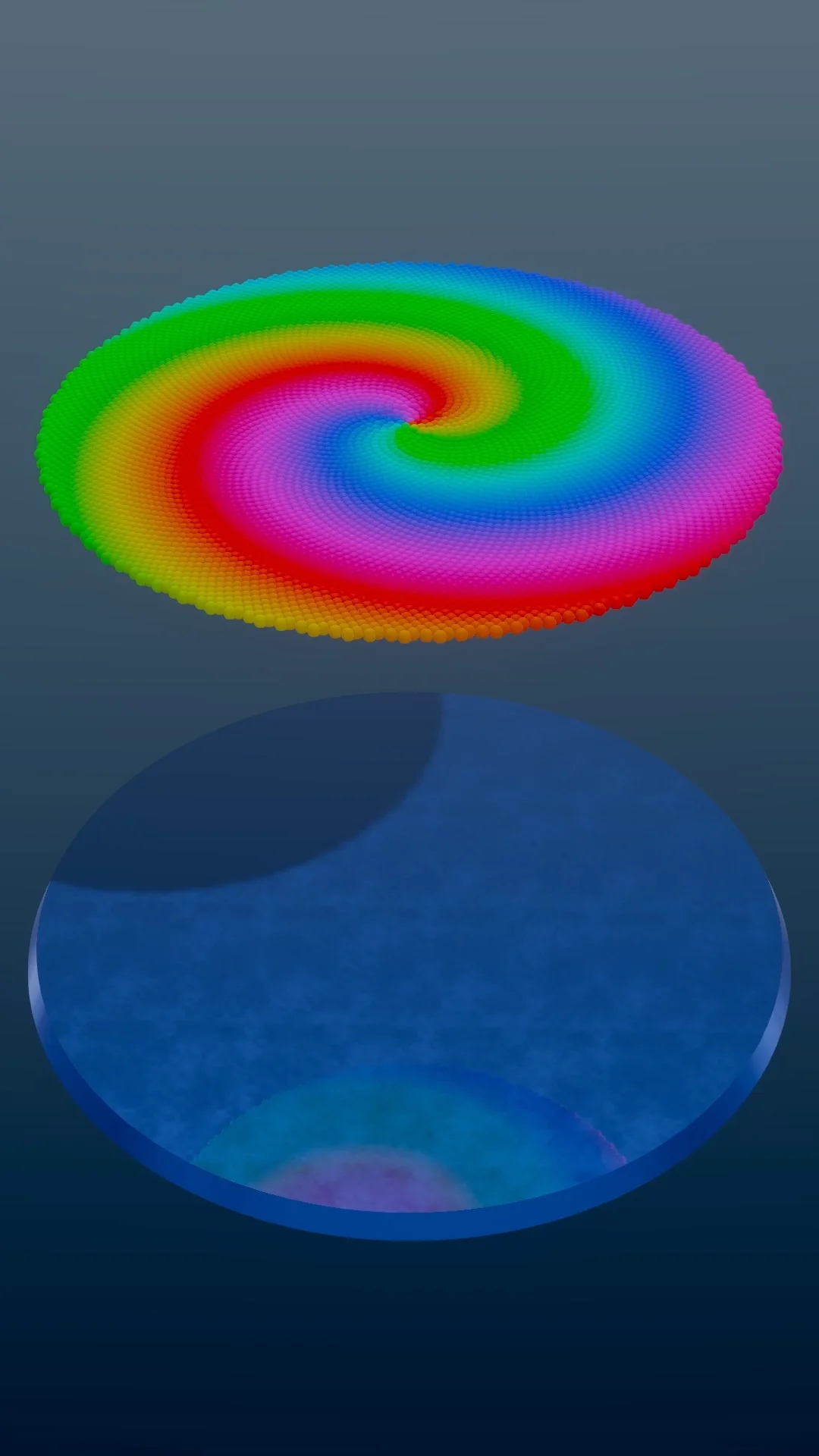
Wave 3D Mode moves the simulation into three dimensions. Hundreds of 3D spheres or cylinders sit in a grid layout and rise, drop, swirl and ripple in wave formations.

The motion can follow mathematical harmonics or sync to the beat and notes of a song or MIDI file. When an element hits the floor plate it plays an impact sound, such as a steel chime, so you hear every hit.

Wave 3D renders with WebGL on your graphics card, so the camera can orbit the grid and the scene has real depth, shadows and colour gradients across the wave surface.

How a run plays out

The exact sequence the engine runs in this mode, from the first frame to the moment the run resolves.
  1. 1.

    3D grid elements form the layout

    You choose the arrangement of the elements: Hexagonal Grid, Square Grid, Phyllotaxis Spiral, Concentric Rings, or Flower of Life. Grid spacing and count set the spatial density.

  2. 2.

    Formations drive the kinetic wave motion

    The active Formation (Bounce Drop, Rise, Ripple, Swirl, Spiral, or Wave Cascade) determines how wave energy propagates across the 3D grid over time.

  3. 3.

    Harmonics and music sync the movement

    Wave Sync styles (March, Beat Sync, Orbit, Spiral Harmony) lock the oscillation frequencies to your song tempo and scale notes, so the motion keeps time with the music.

  4. 4.

    Ground platform impacts trigger audio foley

    When elements strike the floor plate, Material Audio plays impact sounds and chime notes, so you can hear the ripple move across the grid.

Every control in Wave 3D Mode

These are the settings this mode adds on top of the shared physics, visual, audio, and export controls. Names match the studio sidebar exactly.

Formations and propagation

  • Formation
  • Drop Height
  • Wave Amplitude
  • Wave Frequency
  • Propagation Speed
  • Reverse Direction
  • Order Invert

These define the kinematic motion curve. Bounce formations simulate gravity drops, while wave sweeps produce continuous undulating ribbons.

Grid geometry and layout

  • Layout Pattern
  • Grid Density
  • Element Radius
  • Element Height
  • Spacing Factor
  • Platform Match Layout

Layout defines the top-down arrangement of elements, from rigid square arrays to organic golden-ratio phyllotaxis spirals.

Audio and impact foley

  • Material Audio
  • Impact Sound Effect
  • Rim Sound Effect
  • Impact Volume
  • Pitch Tracking
  • Melody Sync

Material Audio gives every drop an impact sound, and Melody Sync maps notes across the grid.

Color and visual materials

  • Color Mode
  • Radial Ramp
  • Height Gradient
  • Rainbow Cycle
  • Base Color
  • Highlight Color
  • Floor Plate

Color modes shade the grid based on live elevation, distance from center, or rainbow time phasing.

3D camera and lighting

  • Camera Pitch
  • Camera Orbit Speed
  • Field of View
  • Studio Lighting
  • Shadow Intensity
  • Ground Reflection

Sets the camera angle, camera movement and lighting for a vertical video.

Wave 3D Mode example runs

Every clip below was rendered in this mode. Nothing here is borrowed from another mode.
Viral 9:16 Bouncing Ball Run - Music-Synced Loop

Viral 9:16 Bouncing Ball Run - Music-Synced Loop

Watch this music-synced musical bouncing ball simulation. Renders vertical portrait 9:16 videos optimized for TikTok and YouTube Shorts.

Why Wave 3D Mode videos hold attention

What keeps people watching this mechanic.

The motion reads at a glance

A grid moving in waves is easy to understand without a caption, and the pattern keeps changing, so there is always something new to look at.

Sound and motion land together

When the waves strike the floor in time with a melody or beat, the picture and the sound agree, which makes the video pleasant to watch to the end.

It loops cleanly

Formations repeat on an exact cycle. Export a whole number of cycles and the last frame matches the first, so the video loops cleanly on Shorts, Reels and TikTok.

Depth sets it apart

3D lighting, glass materials and soft contact shadows give the video a depth that flat 2D animations do not have.

Videos you can make in this mode

Each of these is a different configuration of the same mode, so one setup session produces a batch of related uploads.

Phyllotaxis golden-ratio swirl

A spiraling sunflower seed grid with a height-based rainbow gradient and soft ambient impact sounds. Suits calm ASMR-style videos.

Concentric gravity drop cascade

Rings of cylinders that drop from the outer edge inward, striking the plate in ascending musical notes before rebounding.

Beat-synced hexagon pulse

A dense hexagonal grid that ripples outward on every drum kick, with high-contrast neon highlights against a dark floor.

Top-down mandala

Camera locked directly above a Flower of Life grid, watching harmonic interference patterns form kinetic optical illusions.

Slow camera orbit

A slow rotating 3D camera moving around a rippling wave field with soft studio shadows and deep color gradients.

Make your first Wave 3D Mode video

The order that works. Following it out of sequence usually means retuning settings you already set.
  1. 1.

    Open Wave 3D in the Studio

    Pick Wave 3D in the Studio mode picker. The 3D scene loads in the preview.

  2. 2.

    Pick a layout and formation

    Choose a geometric layout (e.g. Phyllotaxis or Hexagonal) and a signature formation like Bounce or Radial Wave.

  3. 3.

    Attach melody or sound effect

    Enable Material Audio and select a scale or sound preset so that impacts produce clean acoustic notes on contact.

  4. 4.

    Adjust colors and 3D camera angle

    Select Radial Ramp or Height Gradient, dial in high-contrast tones, and set the camera angle for vertical 9:16 portrait framing.

  5. 5.

    Export 60fps 9:16 video reel

    Review the loop cycle duration, export at 1080x1920 60fps, and publish directly to Shorts, TikTok, and Instagram.

Settings that make the difference

  1. Use Height Gradient coloring to make wave peaks pop with brighter highlights than the troughs.
  2. Keep one full wave cycle between 5 and 15 seconds, so a short video holds a whole number of cycles and loops cleanly.
  3. Soft steel chimes with a slow ripple speed give a calm, ASMR-style sound.
  4. Phyllotaxis layout with Radial Ramp gives the most organic patterns in a vertical frame.
  5. Enable Ground Reflection and contact shadows to give the 3D platform physical weight.

What breaks a run

  1. Setting propagation speed too high, which turns clean kinetic waves into chaotic visual noise.
  2. Using low contrast ball and floor colors on a bright background, reducing spatial depth.
  3. Over-tightening the camera field of view so the outer wave ripples get cut off at phone borders.
  4. Disabling material foley sounds when building music-synced rhythm runs.

The mathematics of kinetic 3D waves

Wave 3D Mode uses procedural harmonic equations to compute height displacement for every element in the grid simultaneously. By sampling distance from a central focal point and applying trigonometric wave formulas with controllable phase shifts, the simulation creates continuous, non-repeating or cleanly periodic kinetic waves.

Different layout geometries transform how those waves propagate. A regular Cartesian grid produces rectangular diffraction patterns, while a Phyllotaxis arrangement (based on the golden ratio spiral) disperses wave energy in spiraling arms reminiscent of natural biological forms.
Spatial lighting and 3D rendering performance

Rendering hundreds of dynamic 3D elements at 60fps requires an optimized GPU pipeline. Wave 3D batches geometry rendering through custom instance buffers on the GPU, allowing each element to calculate its transform and material elevation in real time without CPU bottlenecks.

The lighting uses key and rim lights with soft contact shadows on the floor plate, which gives the elements a sense of weight in the scene.

Wave 3D Mode questions

Open Wave 3D Mode

Every control on this page is already in the studio. Load the mode and start from a working run.