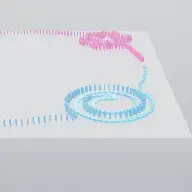
BallEngine

Voxel 3D:
Cubes that build something

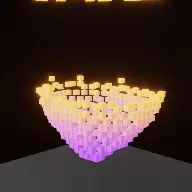
Voxels arriving a chunk per beat to assemble a recognisable artwork, hold it, and morph into the next one.
Play the preview

In development0 creators want this next

A frame from Voxel 3D
Open the studio to run this mode live.

Voxel 3D is being built right now

The engine, the physics and the look are done enough to watch. What is not finished is everything around them: the settings, the presets and the export path. So we shipped it as a preview instead of sitting on it.

The order is decided by these votes rather than by us, and the most-voted modes go first. If this is the one you want, say so.

What you can do now
Open it in the studio and watch a full run, with sound, exactly as it stands today.
What is held back
Settings, randomize and export. The preview runs on our defaults so every viewer judges the same version.
When it ships
The most-voted unfinished mode is the one we take next.

What Voxel 3D does

Cubes assembling a recognisable artwork a chunk per beat, or blooming and collapsing as slow-motion fireworks made of voxels.

Voxel 3D runs two engines on one grid. The automaton is a 3D cellular automaton whose clusters bloom outward and collapse back in, which looks like slow-motion fireworks made of cubes. It is endlessly varied and endlessly the same, because it can never resolve into a shape, so there is nothing to anticipate.

The sculpt engine is the answer to that, and it is the default. The voxels assemble a recognisable artwork a chunk at a time, one generation per beat, hold it once complete, then morph into the next one. That gives the mode a beginning, a middle and a payoff, which the automaton alone cannot have.

The third option splits the difference. Art bloom seeds the automaton from an artwork, so the fireworks erupt out of a heart or a skull rather than out of a featureless sphere. You get the automaton’s unpredictability with a recognisable starting image.

How a run plays out

The exact sequence the engine runs in this mode, from the first frame to the moment the run resolves.
  1. 1.

    One generation per beat

    The grid advances once per beat, which is the natural discrete mapping for a discrete simulation. Nothing moves between beats, so every change is on the music.

  2. 2.

    Sculpt assembles an artwork

    Voxels arrive in chunks and build a recognisable model. Build order decides whether it appears bottom up, outward from the centre, or by flying in from off screen.

  3. 3.

    The finished piece holds

    Once complete the artwork holds so the viewer can register what it is, then morphs into the next item in the playlist.

  4. 4.

    The automaton blooms and collapses

    In automaton mode the survive and born neighbour counts define a 3D life rule, and clusters expand and contract under it with auto reseeding when a run dies out.

Every control in Voxel 3D

These are the settings this mode adds on top of the shared physics, visual, audio, and export controls. Names match the studio sidebar exactly.

Engine and artwork

  • Engine
  • Artwork
  • Shuffle All Artworks
  • Playlist
  • Combine With
  • Second Artwork
  • Third Artwork

A playlist turns one export into a sequence of reveals, which is the cheapest way to make a longer video that keeps giving the viewer something new.

Build

  • Fill
  • Build
  • Build Order
  • Voxels Fly In
  • When Finished

Build order is the choreography of the reveal. Flying voxels in from outside the frame reads as assembly; filling from the base reads as construction.

Automaton

  • Grid
  • Rule
  • Survive (neighbour counts)
  • Born (neighbour counts)
  • Auto Reseed
  • Timing
  • Step Mode

Survive and born counts are the life rule. Small changes here are the difference between a cluster that grows forever and one that dies in three generations.

Look

  • Color
  • Color Mode
  • Ramp End
  • Third Ramp Stop
  • Voxel Shape
  • Fade Out
  • Audio

A colour ramp across the grid gives a voxel model depth, which flat colour cannot because every cube is the same shape.

Why Voxel 3D videos hold attention

What keeps people watching this mechanic.

A reveal is something to wait for

A partially assembled artwork is a puzzle. Viewers stay to find out what it is going to be, which the automaton alone never offers.

Every change lands on a beat

One generation per beat means the visual and the music step together with no smoothing or interpolation to blur the link.

Playlists keep restarting the hook

Each artwork is a new question. A three-item playlist is three reveals in one video.

Cubes read at any size

Voxel art is legible on a phone in a way that finer 3D detail is not, so the reveal survives the platform.

Videos you can make in this mode

Each of these is a different configuration of the same mode, so one setup session produces a batch of related uploads.

Single reveal

One artwork assembled chunk by chunk and held. The clearest version of the format.

Playlist run

Three artworks in sequence, each morphing into the next. Longer content with a repeating hook.

Fly-in assembly

Voxels arriving from outside the frame, which reads as construction rather than as appearance.

Art bloom

The automaton seeded from an artwork, so the fireworks erupt out of a recognisable shape.

Pure automaton

Bloom and collapse with no artwork at all. Ambient content with no ending.

Ramped colour model

A three-stop colour ramp through the grid so the finished model has depth and shading.

Make your first Voxel 3D video

The order that works. Following it out of sequence usually means retuning settings you already set.
  1. 1.

    Choose the engine

    Sculpt for a video with a payoff, automaton for ambient content, art bloom for a mix of the two.

  2. 2.

    Pick the artwork

    Choose something recognisable at low resolution. Voxel art rewards bold silhouettes.

  3. 3.

    Set the build order

    Decide how the piece arrives. This is the difference between a reveal and an appearance.

  4. 4.

    Set the hold

    Make sure the finished artwork holds long enough to be recognised before it morphs away.

  5. 5.

    Colour for depth

    Use a ramp rather than a flat colour, so the model reads as a shape rather than as a block.

Settings that make the difference

  1. Sculpt is the default for a reason. The automaton is beautiful and has no ending, which is a problem for a video.
  2. Bold silhouettes survive voxelisation. Fine detail does not, and no colour setting will rescue it.
  3. Hold the finished piece longer than feels necessary. The reveal is the payoff and cutting it short wastes the build.
  4. A playlist is the cheapest long-form content here: one setup, several reveals, one export.
  5. One generation per beat means the music is the timing. Choose a track with a steady pulse.

What breaks a run

  1. A detailed artwork at a coarse grid, which arrives as an unrecognisable lump.
  2. Cutting away immediately on completion, so the thing the whole run was building never gets looked at.
  3. Pure automaton mode for a video that needs an ending, since it structurally cannot have one.
  4. Flat single-colour voxels, where every cube is identical and the model has no readable depth.

Why the automaton needed a second engine

A 3D cellular automaton is genuinely beautiful. Clusters bloom outward, collapse back, and never repeat, which sounds like exactly what a generative visual should be.

It also has no structure. Because it cannot resolve into anything, there is nothing to anticipate and no reason for a viewer to still be there at second twenty rather than second five. Endlessly varied and endlessly the same is a description of a screensaver.

The sculpt engine keeps the same grid, the same beat schedule and the same render path, and adds the one thing missing: a destination. The voxels are assembling something specific, the viewer can start guessing what it is, and completion is a payoff. That is why it is the default rather than the alternative.
One generation per beat

A cellular automaton advances in discrete generations, and music advances in discrete beats. Mapping one to the other is the obvious thing to do and it is right for a reason worth stating: neither side has to be smoothed.

Interpolating a generation across a beat would blur the transitions and lose the crispness that makes voxel work read. Running generations on a free timer would put changes between beats where they look accidental. Stepping exactly once per beat means every change is on the music and every change is sharp.

It also makes the build rate a musical decision rather than a numerical one. A faster track assembles the artwork faster, which is usually the right instinct anyway, and the reveal lands on a beat rather than wherever a countdown happened to finish.

Voxel 3D questions

Open Voxel 3D

Every control on this page is already in the studio. Load the mode and start from a working run.