BallEngine

Glass Slice 3D:
One cut, one note, two halves

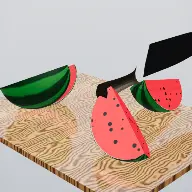
A knife that leads with its edge and draws along its length, taking one piece and splitting it in two on every note until the board is full.
Play the preview

In development0 creators want this next

A frame from Glass Slice 3D
Open the studio to run this mode live.

Glass Slice 3D is being built right now

The engine, the physics and the look are done enough to watch. What is not finished is everything around them: the settings, the presets and the export path. So we shipped it as a preview instead of sitting on it.

The order is decided by these votes rather than by us, and the most-voted modes go first. If this is the one you want, say so.

What you can do now
Open it in the studio and watch a full run, with sound, exactly as it stands today.
What is held back
Settings, randomize and export. The preview runs on our defaults so every viewer judges the same version.
When it ships
The most-voted unfinished mode is the one we take next.

What Glass Slice 3D does

A knife takes one piece and splits it in two on every note, so the board fills by doubling with real cut faces on every piece.

Glass Slice 3D is a knife, a board and a fruit. Each cut takes one piece and splits it into two, so the board fills by doubling: one, two, four, eight, sixteen. One cut per note of the melody, unhurried, with the cut faces showing real flesh where the blade went through.

That progression is deliberate and it replaced something worse. An earlier version fractured every slice into dozens of Voronoi shards, which produced over a thousand fragments in under seven seconds. That is a shatter, not a slice, and it lost exactly what people watch cutting videos for.

The cut itself is modelled as a cut rather than as a split. The cut plane is the knife’s own flat plane, so the edge leads instead of the broad side, and on top of the descent the knife draws along its length. A real cook slices and never presses, and a blade that only presses reads as wrong even when the geometry is right.

How a run plays out

The exact sequence the engine runs in this mode, from the first frame to the moment the run resolves.
  1. 1.

    One piece, one cut, one note

    Each note of the melody triggers a single cut. The cut selects one existing piece and splits it in two, so the piece count doubles rather than exploding.

  2. 2.

    The edge leads and the blade draws

    The cut plane is the knife’s own plane so the edge goes first, and the knife pulls along its length during the descent. That draw is what makes it read as slicing rather than pressing.

  3. 3.

    The cut face is real flesh

    Where the blade passes, the new faces show interior material rather than a flat cap. Every piece on the board carries the record of how it was made.

  4. 4.

    The board fills by doubling

    Because every cut doubles the count, the board goes from one object to a crowded field in a small number of notes, which is the arc of the video.

Every control in Glass Slice 3D

These are the settings this mode adds on top of the shared physics, visual, audio, and export controls. Names match the studio sidebar exactly.

The fruit

  • The Fruit
  • Fruit
  • Cutting
  • Slice Pattern

Slice pattern decides which piece the next cut takes and along what axis, which is what makes a run feel methodical or arbitrary.

The knife

  • The Knife
  • Show Knife
  • Knife
  • Blade Color

Showing the knife is usually right. The tool doing the work on screen is a large part of why the format is satisfying.

Board and physics

  • The Board
  • Board
  • Physics & Juice
  • Juice Spray

Juice is the payoff detail on each cut. It should be visible enough to register and light enough not to cover the cut face.

Sound and overlay

  • Sound
  • Slicing Sounds
  • Crystal Chime
  • Beat Sync
  • Glass Color
  • Color A (base)
  • Color B (top)
  • Overlay
  • Show Counter
  • Hook Line
  • Loop

Two audio layers work together: a physical slicing sound for the cut, and a chime carrying the melody note that triggered it.

Why Glass Slice 3D videos hold attention

What keeps people watching this mechanic.

Cutting is a universal satisfying trigger

Clean cuts through material are among the most reliably watched short-form content there is, and this one is geometry rather than a video effect.

Doubling gives visible progress

The board is measurably fuller after each cut, so a viewer can see the run advancing without any counter.

One cut per note keeps it musical

Cuts land on the melody, so the pacing is rhythmic and the run has an audible structure.

The cut faces are the detail

Real interior surfaces reward looking closely, which is what keeps this from being a loop people watch once.

Videos you can make in this mode

Each of these is a different configuration of the same mode, so one setup session produces a batch of related uploads.

Straight doubling run

One fruit, a steady slice pattern, knife visible. The clearest version of the format.

Methodical pattern

A slice pattern that works through the board in a visible order, so the run reads as deliberate rather than random.

Juice feature

Stronger juice spray so each cut has a wet payoff. Best with a darker board for contrast.

Chime-led

A crystal chime carrying the melody over quieter slicing sounds, which makes the run feel delicate.

Counter run

The counter on so the doubling is stated as a number as well as shown.

Looping board

A loop so the board resets and starts again, for feeds that reward repeat watch time.

Make your first Glass Slice 3D video

The order that works. Following it out of sequence usually means retuning settings you already set.
  1. 1.

    Choose the fruit

    The material decides what the cut faces look like, which is the detail the whole format rests on.

  2. 2.

    Set the slice pattern

    Pick how the next piece is chosen. A visible order makes the run feel authored.

  3. 3.

    Show the knife

    Leave the blade visible and set its colour to read against the board.

  4. 4.

    Sync to the melody

    Turn on beat sync so cuts land on notes rather than on a timer.

  5. 5.

    Tune the juice

    Enough to register on each cut, not so much that it covers the faces you just made.

Settings that make the difference

  1. One cut per note is the pacing. Resist speeding it up, because the slowness is what makes each cut readable.
  2. Contrast between the board and the fruit interior is what makes cut faces visible. Set the board colour last.
  3. The draw along the blade is the difference between slicing and pressing. It is on by default for a reason.
  4. Doubling gets crowded quickly. Plan the run length around the number of cuts, not the number of seconds.
  5. A crystal chime layered over the slicing sound lets the melody carry without losing the physicality.

What breaks a run

  1. Cutting too fast, which turns a slice format into a shatter and loses the entire appeal.
  2. A board colour close to the fruit interior, which makes the cut faces invisible.
  3. Hiding the knife, which removes the tool and leaves pieces separating for no visible reason.
  4. Too many cuts, leaving a board so crowded that the last few splits cannot be seen.

Why a slice is not a shatter

The first version of this mode fractured each piece into dozens of Voronoi shards. It was technically impressive and completely wrong for the format: a run produced over a thousand fragments in under seven seconds, and what viewers watch cutting videos for is not fragmentation.

A slice is a single clean division of one thing into two, slowly enough to be followed. The satisfaction comes from the completeness of the separation and from seeing the interior, neither of which survives being multiplied by seventy.

So the rule became one cut, one piece, two halves, one note. The board still fills quickly, because doubling is fast, but every individual event stays legible and every piece on the board is a whole object rather than a shard.
Making a cut read as a cut

Three things separate a convincing cut from a geometric split. The first is that the cut plane is the knife’s own plane, so the edge leads. A plane that does not match the blade produces a split the broad side of the knife apparently caused, and it looks wrong immediately.

The second is the draw. Real cutting pulls along the length of the blade rather than pressing straight down, and adding that motion to the descent changes the read entirely even though the resulting geometry is identical.

The third is the face. A cut that caps the new surface with a flat colour looks like a hollow shell. Showing real interior material at the cut means every piece carries evidence of how it was made, which is what rewards a viewer for looking closely at the crowded board at the end of a run.

Glass Slice 3D questions

Open Glass Slice 3D

Every control on this page is already in the studio. Load the mode and start from a working run.