BallEngine

Marble Run:
A course built from your song

The platforms are placed where the marble will be when each note is due, so a marble falling under ordinary gravity plays your melody one landing at a time.
Play the preview

In development0 creators want this next

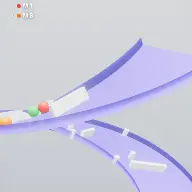
A frame from Marble Run
Open the studio to run this mode live.

Marble Run is being built right now

The engine, the physics and the look are done enough to watch. What is not finished is everything around them: the settings, the presets and the export path. So we shipped it as a preview instead of sitting on it.

The order is decided by these votes rather than by us, and the most-voted modes go first. If this is the one you want, say so.

What you can do now
Open it in the studio and watch a full run, with sound, exactly as it stands today.
What is held back
Settings, randomize and export. The preview runs on our defaults so every viewer judges the same version.
When it ships
The most-voted unfinished mode is the one we take next.

What Marble Run does

A marble falls down a course of platforms, and the course was built backwards from your song so that every landing is a note.

Marble Run looks like a marble rolling down a track. It is actually the opposite: the track is calculated from the music before the run starts, so that a marble under plain ballistics lands on a platform at the exact moment each note is due. Nothing pushes the marble and nothing corrects it mid-flight.

That inversion is what makes the mode worth using. A rhythmic mode that forces a ball onto the beat can look slightly wrong, because the motion is being bent to fit the timing. Here the timing is baked into the geometry, so the physics is left alone and the sync is exact by construction.

The result reads as a long descending course with a marble picking its way down it, playing your melody one landing at a time. Because the platform positions come from the note spacing, a different song produces a visibly different course, and a song with a busy passage produces a visibly denser one.

How a run plays out

The exact sequence the engine runs in this mode, from the first frame to the moment the run resolves.
  1. 1.

    The song is read before the marble moves

    The note onsets from your melody are solved into a course. Each platform is placed where a marble launched from the previous one will be at the instant the next note is due, so the course is a physical drawing of the rhythm.

  2. 2.

    The marble falls under plain ballistics

    Position is evaluated in closed form from the current platform contact point and the stored launch velocity, rather than integrated frame by frame. The path is identical to integrating the same gravity, so it still reads as physics while staying frame-rate independent.

  3. 3.

    Each landing plays the next note

    Contact is the trigger. Because the platform is where it is precisely so the marble arrives on time, the note and the impact land together with no correction, on any device and at any frame rate.

  4. 4.

    The camera follows the descent

    A full course runs far taller than the frame, so the camera tracks the marble down it. Ball Screen Position decides where in the frame the marble sits and Camera Smoothness decides how tightly the view follows.

Every control in Marble Run

These are the settings this mode adds on top of the shared physics, visual, audio, and export controls. Names match the studio sidebar exactly.

Course shape

  • Course Path
  • Platform Spacing
  • Side Travel
  • Curve Depth
  • Chute Width

These decide what the descent looks like without touching the timing. Side Travel and Curve Depth are the difference between a straight drop and a course that snakes across the frame.

Motion and pacing

  • Playback Speed
  • Travel Per Note (speed)
  • Bounce Style
  • Bounce Height

Travel Per Note is the main pacing control: it sets how far the marble covers between two notes, which is what makes a course feel fast or deliberate at the same song tempo.

Platforms

  • Platform Thickness
  • Platform Length
  • Platform Color
  • Art Style

Longer platforms make landings look forgiving, shorter ones make each landing look like it only just worked. Art Style swaps the whole visual treatment of the course.

Camera and framing

  • Ball Screen Position
  • Camera Smoothness
  • Death Zone Margin

Keeping the marble slightly above centre shows more of the course ahead, which is what lets a viewer anticipate the next landing instead of only seeing it happen.

Why Marble Run videos hold attention

What keeps people watching this mechanic.

Every landing is a resolved beat

The viewer hears the note and sees the contact at the same instant. That pairing is the most reliable satisfying-video mechanic there is, and this mode delivers it exactly rather than approximately.

The course ahead is visible

Because the camera looks slightly down the run, there is always a next platform in frame. A viewer with something to anticipate stays for it.

Descent implies an ending

Downward motion reads as progress toward a finish. The run is going somewhere, which is a much stronger reason to keep watching than a loop that could continue indefinitely.

The song is legible as a shape

Dense passages produce clusters of platforms and sparse ones produce long gaps. Viewers can see the music before they consciously notice they are reading it.

Videos you can make in this mode

Each of these is a different configuration of the same mode, so one setup session produces a batch of related uploads.

One song, one descent

A recognisable melody, a course long enough to carry it, and no other elements. The purest version of the mode.

Snaking course

High Side Travel with real Curve Depth so the marble crosses the frame repeatedly on the way down. Fills a vertical frame far better than a straight drop.

Fast run

Raise Travel Per Note so the marble covers more ground between notes. The same song produces a longer, faster-feeling course.

Tight chute

Narrow the chute so the marble is threading a gap on every landing. The margins look far finer than they are, because the course guarantees the landing.

Art style series

The same song and course shape shot in each available art style. One setup session, several visually distinct videos.

Long-form descent

A full-length track and a course to match, for the platforms where a three-minute satisfying video outperforms a thirty-second one.

Make your first Marble Run video

The order that works. Following it out of sequence usually means retuning settings you already set.
  1. 1.

    Load the song first

    The course is generated from the melody, so nothing about the geometry is meaningful until the music is chosen.

  2. 2.

    Set the pace

    Adjust Travel Per Note until the marble covers a comfortable distance between notes. Too little and the course is cramped, too much and the camera is racing.

  3. 3.

    Shape the descent

    Use Side Travel and Curve Depth to fill the width of the frame. A course that only drops leaves most of a vertical canvas empty.

  4. 4.

    Frame the camera

    Put the marble slightly above centre so the upcoming platforms are visible, then raise Camera Smoothness until the view stops snapping.

  5. 5.

    Play it through once

    Watch a full run before exporting. The generated course is deterministic, so what you see is what the export produces.

Settings that make the difference

  1. Change Travel Per Note before you change anything else. It is the single control that decides whether a course feels frantic or considered.
  2. A song with even note spacing makes an even course. If you want visual variety in the geometry, pick a melody with rhythmic variety.
  3. Short platforms read as skill. The marble always lands, so the only thing a smaller platform costs you is the appearance of difficulty.
  4. Camera Smoothness is worth more than it sounds. A hard-following camera turns a smooth descent into something that feels like it is being chased.
  5. Keep the chute inside the mobile safe area. Courses with high Side Travel can push the marble under the interface at the widest points.

What breaks a run

  1. Treating the platforms as decoration. They are the rhythm, so moving them arbitrarily is editing the song.
  2. Setting Travel Per Note so high that the marble outruns the camera. The landing still lands on the beat, but the viewer never sees it happen.
  3. Using a very dense song without raising Platform Spacing. Closely packed notes produce closely packed platforms and the course turns into a wall.
  4. Framing the marble at the bottom of the screen. There is then nothing ahead of it and the whole anticipation benefit is lost.

Why the course is solved instead of the marble being pushed

There are two ways to make a marble land on the beat. You can drive the marble, adjusting its velocity so it arrives when the note is due, or you can place the platform where the marble was always going to be. Rhythmic Mode takes the first approach and it suits a ball bouncing in a fixed container. A descending course suits the second, because there is a free variable available: where to put the next platform.

Solving the course has a second benefit that matters more than it sounds. Because the marble is never corrected, its motion is genuinely ballistic, and viewers are unexpectedly good at spotting motion that has been nudged. A run where every arc is a true parabola looks right in a way that is hard to articulate and easy to feel.

It also makes the export reliable. Position is evaluated in closed form rather than integrated frame by frame, so a slow device, a fast device and an offline render all produce the same trajectory. A mode whose whole appeal is exact sync cannot afford to drift on a long export, and this one structurally cannot.
Shaping a descent that fills a vertical frame

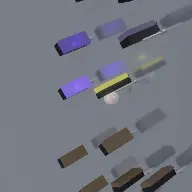
The default course drops. That is correct for the physics and wrong for a phone screen, which is tall but also has width to spend. Side Travel is what buys that width back, pushing consecutive platforms further apart horizontally so the marble crosses the frame as it descends.

Curve Depth then decides whether that crossing is a straight diagonal or a curve. Curves read as designed and diagonals read as generated, which is a purely aesthetic difference but a consistent one across the examples that perform well.

The limit is the camera. Every unit of horizontal travel is width the camera has to cover, and past a certain point either the marble gets small or the view starts panning enough to be noticeable. Raise Side Travel until the motion starts feeling wide, then take one step back.

Marble Run questions

Open Marble Run

Every control on this page is already in the studio. Load the mode and start from a working run.