BallEngine

Marble Run 3D:
The marble plays the instrument

A course solved from your song where every platform is part of a real instrument, so each landing is the note you are hearing.
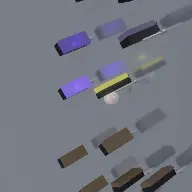
A frame from Marble Run 3D
Open the studio to run this mode live.

What Marble Run 3D does

A marble descends a 3D course whose every platform is part of a real instrument, such as a piano key, a xylophone bar or an organ pipe, so it plays the instrument you are hearing.

Marble Run 3D takes the solved-course idea and dresses it in a real instrument. The course is generated from your song exactly as in the flat version: platforms are placed so a free-falling marble contacts one at every note onset, with the sync exact by construction rather than corrected frame by frame.

What is new is what the platforms are. Each one is drawn as an element of the instrument you are hearing: a piano key, a xylophone bar, a drum head, an organ pipe, a string, a bell or a synth pad. The marble is not accompanied by a piano, it is landing on the keys, and the key it lands on is the note you hear.

Between phrases the marble rides a steel rail rather than falling through nothing, and long rests become a visible channel it travels along. A medley can string several songs into one descent, each with its own 3D label appearing where that section begins.

How a run plays out

The exact sequence the engine runs in this mode, from the first frame to the moment the run resolves.
  1. 1.

    The song becomes a course

    Note onsets are solved into a descending platform course, closed-form and frame-rate independent, so the marble is in the right place at the right instant without being pushed.

  2. 2.

    Platforms are instrument elements

    Each platform is rendered as part of the chosen instrument, and its position in the instrument reflects the pitch of the note it plays. Higher notes sit where higher notes belong.

  3. 3.

    Rails carry the rests

    Long gaps between notes become a steel channel the marble rides along, so a rest is visible travel rather than an unexplained pause in the middle of the run.

  4. 4.

    Medleys chain songs together

    Several songs can be sequenced into one descent, each with a start point, a play length, a gap after it, and a 3D label that appears where that section begins.

Every control in Marble Run 3D

These are the settings this mode adds on top of the shared physics, visual, audio, and export controls. Names match the studio sidebar exactly.

The instrument

  • The Instrument
  • Instrument

This is the whole visual identity of the run. A piano course and an organ course from the same song look nothing alike.

The course

  • The Course
  • Course Path
  • Bounce Style
  • Steel Channel (long rests only)
  • Rail Color
  • Slab Color

Course Path shapes the descent through the scene. The steel channel only appears on genuinely long rests, so it reads as a deliberate feature rather than as filler.

Medley

  • Medley (many songs, one run)
  • Song
  • Start Into Song (0 = beginning)
  • Play Length (0 = to the end)
  • Gap After (sec, marble rides the rail)
  • Accent Color
  • Label Color
  • 3D Label (shown where this section starts)

A medley turns one export into a several-minute piece. The per-section label is what tells the viewer the song has changed.

Text and loop

  • 3D Text
  • Text
  • Position (0 = start, 1 = end)
  • Size
  • Offset X
  • Offset Y
  • Style
  • Turn (degrees)
  • Color
  • Seamless Loop
  • Loop Length From
  • The Marble

3D text sits in the scene at a chosen point along the course, so a title or a channel name is part of the world rather than an overlay on top of it.

Why Marble Run 3D videos hold attention

What keeps people watching this mechanic.

The instrument is doing the playing

A marble striking a piano key that then sounds is a causal chain a viewer accepts instantly, and it is far more convincing than a ball with music behind it.

Pitch is visible as position

Because platforms sit where their notes belong on the instrument, the melody has a shape in space. Viewers read the tune before they know they are reading it.

Rests become motion

The rail turns a silent bar into visible travel, so the run never has an unexplained gap where nothing is happening.

Medleys extend watch time honestly

A three-song descent is three times the video without three times the setup, and the labels give the viewer a reason to stay for the next section.

Videos you can make in this mode

Each of these is a different configuration of the same mode, so one setup session produces a batch of related uploads.

Single song, single instrument

One recognisable melody on a piano course. The clearest version and the best first video.

Instrument series

The same song shot on piano, xylophone, drums, organ pipes, strings, bells and synth pads. One setup, seven visually distinct videos.

Medley run

Three or four songs in one descent with labels. Long-form content that keeps giving the viewer a new hook.

Titled course

3D text placed early in the run so the title is part of the scene rather than an overlay.

Seamless loop

A loop length that closes cleanly, for feeds that reward repeat watching.

Rail feature

A song with long rests so the steel channel appears repeatedly and becomes part of the course’s character.

Make your first Marble Run 3D video

The order that works. Following it out of sequence usually means retuning settings you already set.
  1. 1.

    Choose the song and the instrument

    These two decisions define the video. Everything else is dressing on top of them.

  2. 2.

    Shape the course path

    Pick a path that fills the frame in three dimensions rather than dropping straight down the middle.

  3. 3.

    Check the rests

    Play through and look at where the steel channel appears. If it never does, the song has no long rests and the rail settings are irrelevant.

  4. 4.

    Add labels if it is a medley

    Each section needs a label placed where it starts, or the viewer will not register that the song changed.

  5. 5.

    Set the loop

    If the video is going to loop, set the loop length from a musical boundary so the seam falls where the ear expects it.

Settings that make the difference

  1. The instrument is the single biggest look decision. Change it before you change any colour.
  2. Songs with a wide pitch range make better courses, because the platforms spread across more of the instrument.
  3. Use 3D text sparingly and place it early. Text in the middle of a descent competes with the marble.
  4. A medley is the cheapest long-form content in the studio: one setup, several songs, one export.
  5. Note sync is exact by construction, so if something looks off it is the course path, not the timing.

What breaks a run

  1. Choosing a song with a narrow pitch range, which produces a course clustered on a few keys and a monotonous descent.
  2. A course path so tight that the camera cannot show the instrument, which removes the entire premise.
  3. Medley sections with no labels, leaving the viewer unsure why the music changed.
  4. Overusing 3D text, which turns a scene into a slide.

Why the platform has to be the instrument

A marble run with music behind it is a music video. A marble run where the marble strikes a piano key and that key sounds is a performance, and viewers respond to the two very differently even when the audio is identical.

The difference is causality. If the platform is a generic slab, the sound is an accompaniment the viewer accepts as a convention. If the platform is a key, the sound has a visible cause, and every landing becomes evidence rather than decoration.

That is also why pitch maps to position on the instrument. A high note landing on a low key would break the illusion instantly for anyone who plays, and the people most likely to share a video like this are exactly those people.

Rests, rails and medleys

Solving a course from note onsets leaves a problem: what does the marble do during a two-bar rest? Falling through empty space for two bars looks like the video has broken. So long rests are given a steel channel the marble rides along, converting silence into travel.

The medley system extends the same thinking to whole songs. Each section has its own start point, play length and gap, and the gap is rail travel between them, so the joins are part of the run rather than cuts.

That makes long-form genuinely cheap here. A four-song medley is one configuration and one export, and the 3D labels give each section its own moment of arrival, which is what keeps a longer video from feeling like the same idea repeating.

Marble Run 3D questions

Open Marble Run 3D

Every control on this page is already in the studio. Load the mode and start from a working run.