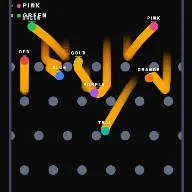
BallEngine

Weapon Ball Battle:
Armed balls, one survivor

Named fighters, weapons that orbit or have to be grabbed off the floor, visible HP, and a finisher on the last blow.
Play the preview

In development0 creators want this next

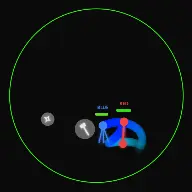
A frame from Weapon Ball Battle
Open the studio to run this mode live.

Weapon Ball Battle is being built right now

The engine, the physics and the look are done enough to watch. What is not finished is everything around them: the settings, the presets and the export path. So we shipped it as a preview instead of sitting on it.

The order is decided by these votes rather than by us, and the most-voted modes go first. If this is the one you want, say so.

What you can do now
Open it in the studio and watch a full run, with sound, exactly as it stands today.
What is held back
Settings, randomize and export. The preview runs on our defaults so every viewer judges the same version.
When it ships
The most-voted unfinished mode is the one we take next.

What Weapon Ball Battle does

Named, coloured fighters carry orbiting weapons and cut each other down until one is left, with HP bars, damage numbers and a finisher on the KO.

Weapon Ball Battle is the fight format. Two to four fighters share an arena, each with a name, a colour and a weapon, and they damage each other on contact until one is standing. Everything a viewer needs to follow it is on screen: HP bars, names, damage numbers as they land.

There are two battle styles and they produce genuinely different videos. In Orbit, every fighter carries a weapon that circles them permanently, and damage happens when that weapon sweeps across an opponent. It is the classic viral format, continuous and readable, and the outcome turns on positioning.

In Pickup, fighters start unarmed and weapons keep spawning around the arena. The first fighter to touch one equips it, melee weapons break after a few hits, a gun fires once, a shuriken or boomerang is thrown. The weapon is then consumed and the fighter has to reach the next spawn, which turns the match into a continuous arms race.

How a run plays out

The exact sequence the engine runs in this mode, from the first frame to the moment the run resolves.
  1. 1.

    Fighters enter with identity

    Each fighter gets a colour and a name, both shown on screen. HP Affects Size makes a wounded fighter visibly smaller, so the state of the match is readable from the shapes alone.

  2. 2.

    Weapons deal contact damage

    In Orbit style the weapon circles its owner and damages whatever it sweeps into. A gun orbits the same way but fires bullets rather than dealing contact damage, which changes the range at which a fighter is dangerous.

  3. 3.

    Pickup style consumes weapons

    Weapons spawn at random points and the first fighter to touch one equips it. Melee weapons last a limited number of hits, thrown weapons are gone once thrown, and a gun fires a single shot. Then it is back to the scramble.

  4. 4.

    The KO ends it

    The last fighter standing wins. Shatter on KO and the cinematic finisher turn the final blow into an event rather than a fighter quietly disappearing.

Every control in Weapon Ball Battle

These are the settings this mode adds on top of the shared physics, visual, audio, and export controls. Names match the studio sidebar exactly.

Battle setup

  • Battle Style
  • Style
  • Weapon Type
  • Weapon Pool
  • Fighters

Battle Style is the structural choice between Orbit and Pickup. The weapon pool decides what can spawn in Pickup, which is how you keep a series varied without changing anything else.

Fighter identity

  • P1 Color
  • P1 Name
  • P2 Color
  • P2 Name
  • P3 Color
  • P3 Name
  • P4 Color
  • P4 Name
  • HP Affects Size
  • Show HP Bars
  • Show Names

Naming the fighters is what turns a physics run into a match. Viewers pick a side within two seconds if there is a side to pick.

Impact effects

  • Blood Spray
  • Damage Numbers
  • Hit-Stop Slow-Mo
  • Screen Shake
  • KO Finisher
  • Shatter on KO
  • Cinematic Finisher

Hit-stop is the highest-value setting here. A few frames of freeze on a heavy hit reads as impact far more effectively than any particle effect.

Weapon look and audio

  • Weapon Skins
  • Weapon Tuning
  • Weapon Pickup
  • Weapon Hit
  • Wall Bounce
  • Elimination
  • Victory
  • Override Global Audio

Every weapon type can carry an uploaded sprite and its own sound, so a custom weapon set is a look and an audio signature at the same time.

Why Weapon Ball Battle videos hold attention

What keeps people watching this mechanic.

Viewers pick a side immediately

Names and colours give people someone to want to win within the first seconds. That single act of choosing is what converts a watcher into someone who has to see the end.

HP bars make the state legible

At any moment it is obvious who is ahead and by how much. A close match is visibly close, which is what makes the last exchange worth waiting for.

Comebacks happen on their own

Damage depends on positioning rather than on a script, so a fighter on low health genuinely can turn a match around. Those runs are the ones that get shared.

The KO is a hard ending

A finisher with a shatter and a victory sound gives the video an unambiguous last frame instead of a fade.

Videos you can make in this mode

Each of these is a different configuration of the same mode, so one setup session produces a batch of related uploads.

Classic two-fighter orbit

Two fighters, matching weapons, HP bars on. The plainest version and the best first video.

Four-way free-for-all

Four fighters in one arena. Messier, faster, and far harder to predict, which suits a short runtime.

Pickup arms race

Pickup style with a wide weapon pool. The match becomes about reaching the next spawn first, which produces constant repositioning.

Country or team battle

Name the fighters after teams, countries or characters. The identity does most of the engagement work before the fight starts.

Custom weapon set

Upload sprites and sounds for each weapon type. The same mechanic reads as a completely different product.

Cinematic finish

Hit-stop, screen shake and the cinematic finisher all on, for a match that ends like a fight scene rather than a simulation.

Make your first Weapon Ball Battle video

The order that works. Following it out of sequence usually means retuning settings you already set.
  1. 1.

    Choose the battle style

    Orbit for a continuous readable fight, Pickup for a scramble. This decides everything else about the pacing.

  2. 2.

    Name and colour the fighters

    Give each one a name a viewer can root for and a colour that separates cleanly against your background.

  3. 3.

    Turn on the readouts

    HP bars, names and damage numbers. The match needs to be followable without any commentary.

  4. 4.

    Tune the impact

    Add hit-stop and a modest screen shake. Both are much more effective in small amounts than large ones.

  5. 5.

    Check the ending

    Play through to a KO and confirm the finisher and victory sound land together. That frame is the video’s payoff.

Settings that make the difference

  1. Two fighters is more watchable than four. With four, nobody can track the fight and the outcome feels arbitrary.
  2. HP Affects Size does more work than the HP bar. A shrinking fighter is legible at a glance and at any screen size.
  3. Keep hit-stop short. A long freeze reads as a stutter rather than as impact.
  4. In Pickup style, a narrow weapon pool keeps a match coherent. A pool with everything in it turns each exchange into a different game.
  5. Distinct per-weapon sounds tell the viewer what just happened when the visual is too fast to read.

What breaks a run

  1. Similar fighter colours. If the two sides are not instantly separable, none of the identity work lands.
  2. Every effect at maximum. Blood, shake, slow-mo and damage numbers together bury the fight they are supposed to sell.
  3. Leaving the fighters unnamed. Without names it is two circles hitting each other and there is nobody to support.
  4. A four-fighter match on a short runtime. The eliminations arrive faster than the viewer can register who left.

Orbit and Pickup are two different videos

Orbit style gives every fighter a permanent weapon circling them. Damage is a function of where the two fighters are relative to each other and where their weapons happen to be in their orbits. The fight is continuous, and the whole match is legible as a single ongoing exchange.

Pickup style removes the weapon and makes acquiring one the central problem. Fighters begin harmless, weapons appear at random points, and the first to arrive gets it. Because weapons are consumed, no advantage lasts, and the match becomes a sequence of short armed windows separated by scrambles.

Neither is better, but they suit different lengths. Orbit reads well over a longer run because the state is always clear. Pickup is better short, because the constant reset in advantage keeps the first thirty seconds dense with reversals.
Selling impact without burying the fight

The effects list here is long, and the temptation is to turn everything up. The result is unreadable: blood spray hides the fighters, screen shake blurs positions, damage numbers cover the HP bars, and slow-motion interrupts the exchange that made it fire.

The most efficient single setting is hit-stop. A few frames of freeze on a heavy hit is how every fighting game communicates weight, and it costs nothing visually because the frame is held rather than covered.

After that, damage numbers are the best value, because they tell the viewer how much that exchange mattered. Everything else is garnish, and it works best when only one or two of them are on at a time.

Weapon Ball Battle questions

Open Weapon Ball Battle

Every control on this page is already in the studio. Load the mode and start from a working run.